Posts

Showing posts with the label Flutter

Create Flutter icons for all target types with single png and flutter_launcher_icons

Image
Creating a cross-platform app icon for Flutter can be easy.  Easy enough that it is embarrassing how long I looked away from adding app icons to my apps. Creating an app icon across platforms is especially true if you avoid implementing many platform-specific customizations. You can convert a single PNG image into all the formats needed for Flutter Android, iOS, MacOS, Windows, and Web launcher icons using just one 1000x1000 pixel icon and  flutter_launcher_icons. Caveat This walkthrough does not take into account different icons for light and dark This does not have any Apple Glass handling Create an app icon Create a 1000x1000 pixel icon using the tool of your choice.  The icon at the top of the blog was created for f s-game-score using appicons.ai. I used  https://appicons.ai , which I found via Reddit Mac users may be able to use something like Apple Icon Composer Download the icon created in the step above. It should be a 1000x1000 PNG file. Copy the icon t...

Joy and headaches building a well structured multi-platform Flutter app with CoPilot

Image
You only understand something when you are forced to do it yourself. I've been looking for a way to force myself to build and test a multi-platform application.  A lousy game night scoring experience demanded an NIH solution. So, I built a multi-platform Flutter application using only CoPilot agent prompts. It was a learning experience where I had to cheat, relying on my knowledge to drive CoPilot where I wanted it to go. The end result is a multi-platform Flutter app,  fs_game_score that can be found on GitHub .  This is a generic game scoring app created almost  entirely using VSCode's Copilot  agent mode  with virtually no  hand coding. There were lots  of AI agent prompts with many undo/redo attempts. The application has been tested on Android, IOS, Chrome, macOS, and Windows 11.  At least a dozen lessons learned Coding It helps if you know what libraries you want to use. That lets you direct the copilot to the most up-to-date or best pra...

Flutter messaging classes and their native platform peers

Image
Communication between Flutter modules and Mobile Native code happens over platform channels.  The docs are all over the place so I created this cheat sheet for the different channel types and their class documentation. YouTube walkthrough video Mobile Native Communication Communication between the Mobile native code and Flutter happens over platform channels. Web communication happens via window messaging. Flutter Channel types There are three native platform channel types. V1 of this application uses the  Message Channel Channel type and Flutter class Description Flutter Native Native Flutter Supports Return Method Invoke method on the other side Yes Yes Via result Message Sends a message to a remote listener Yes Yes Via reply Event Streams and sinks. Events can flow in both directions Yes Yes N/A Channel Implementation Classes Dart/Flutter, Android, and iOS have corresponding `channel` classes for each channel type. The three platform channel...

Migrating Native Applications to Flutter entrypoint by entrypoint

Image
Organizations with significant investments in native applications will probably migrate flutter feature-by-feature or navigation flow by navigation flow.  They may be able to migrate from the back of the app to the front of the application with all of the Flutter code in a single package or bound to a single every-growing function set. The alternative approach is to migrate targets of opportunity in different locations across the existing application.  Features-of-opportunity migration means that we will probably end up with a set of unrelated features that will get invoked at different points in the existing native application.  We organize those work streams or flows into their own package .  Each of those packages is essentially its own mini Flutter program with its own main() program.  Android and iOS native applications can import a single Flutter  module  that should contain  all  the Flutter functionality. We need to include all variou...

Demonstrating bidirectional messaging between Flutter and a hosting web app

Image
We're modifying the sample Flutter application to demonstrate bi-directional messaging between the HTML/Javascript and the Flutter code. The sample Flutter counter app is embedded in a web page. It communicates with Javascript via browser window messages. Demonstrates messaging Flutter to the web app via window messages whenever the counter increments. Demonstrates messaging from the web app to Flutter whenever a button is pressed on the HTML page. An "increment" message is passed to Flutter via the browser window messaging which causes the Flutter app to increment its counter. Show me the code Extracted snippets can be seen by scrolling down on this page. https://github.com/freemansoft/flutter-embedded https://github.com/freemansoft/flutter-embedded/tree/main/v1 Video on Joe's YouTube channel The videos are always more expressive than anything I would write here. Demonstration and overview Demonstration and code Flutter Initiated message flow Diagram used in the vid...

Organizing Flutter for standalone and embedding

Image
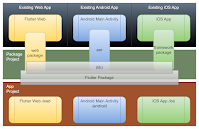
The flutter world is pretty straightforward if you are building new multi-channel applications. You can probably leverage 90% of the same Flutter/Dart code across your Native mobile and web applications. Flutter's out-of-the-box project organization may work with little modification. Enterprises get a different experience when they already have iOS, Android, and web applications on different tech stacks with overlapping functionality.  Enterprises change their tech stack by incrementally replacing native or javascript functionality with Flutter modules.  The Flutter default project structure must be recast in this situation. Organizing Flutter for Standalone and Embedded applications on YouTube The rest of this article is converted in greater depth in the video.  The content exists here for search optimization and will be updated over time. Default "greenfield" organization This is the project structure for a new standalone application that can be deployed as web, Android...