Posts

Showing posts with the label NoSQL

Always free Mongo DB compatible Azure Cosmos DB instances

Image
The Azure Mongo DB version of Cosmos DB provides a sharable, scalable way of working with MongoDB across sites, different teams or different machines. I have a couple development machines and am always looking for ways to work with the same dataset independent of my current physical location and of the developer machine platform I'm using. Always Free Cosmos DB - Mongo DB Microsoft Azure has a Cosmos DB for MongoDB free tier offering. MongoDB (vCORE) has its own SKU (at this time). This means you may be able to use free tier Mongo DB and the free tier standard Cosmos DB You get a dedicated MongoDB cluster with 32 GB storage. The docs don't mention any compute or RU/s limit. From the docs Azure Cosmos DB for MongoDB (vCore) now introduces a new SKU, the "Free Tier," enabling users to explore the platform without any financial commitments. The free tier lasts for the lifetime of your account, boasting command and feature parity with a regular Azure Cosmos DB for MongoDB...

Anti-Affinity for In-Memory Caches or No SQL Data Stores

Image
In-Memory databases and caches, either  SQL or no-SQL, are prized for the high performance and high reliability. They scale up by increasing the number of cache nodes to either partition the data for larger data sets or to replicate the data to support more parallel operations.  Systems often grow to be hundreds of nodes with some providing almost linear growth versus CPU count.    Best practices say to keep  duplicate or redundant copies of data in multiple nodes.  Disaster Recover (DR) is often integrated through WAN data replication features in the enterprise class versions of these products where data is pushed to alternative data centers. Cluster node management and other configuration concerns can can have a big impact on reliability and performance.   Teams should strive to make sure replicated copies of data are as far apart as possible, that they have a low affinity  to each other. Teams who are told "you don't care where the serve...

Scaling Out Data Using In Memory Stores/Caches

Image
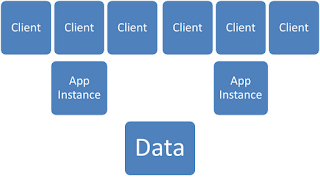
Standard App Topology This diagram shows a basic web app with two app servers.  It is a fairly straightforward architecture where the two app servers are used for load balancing and fault tolerance in case one server goes down.  A single data server or cluster is sufficient. Most  folks would probably actually have a web server tier between the clients and the App Instance tier but I'll skip it so some of the MS folks feel at home.   This diagram shows what happens when you start to increase the number of clients.  One of the beauties of the commodity server architecture is that you can continue to add application server instances to handle the additional load. Data servers can be clustered but there is a finite limit to the data tier size and performance.  You end up with an inverted pyramid where you application is teetering on top of a narrow data tier. NoSQL databases accelerate applications in two ways.  They increase the pe...