Posts

Showing posts with the label Tablet

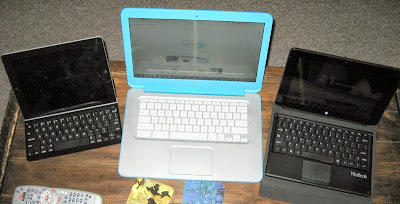
IPad, Chromebook, Windows 8 Tablet long term family test
Image
We've been conducting a long term "family" test on our coffee table for the past year or so. Our test subjects include an IPad (2), an HP Chromebook 14' and a Windows 8 (Winbook) 10" tablet. The devices are primarily used for web surfing, news reading, basic word games, social media and research when people need to prove they are right as part of a discussion. Our previous coffee table device was a Macbook Air that has been appropriated for other uses. Chromebook #1 Coffee Table We've been surprised how much we like this device. A Chromebook takes some getting used to at first because you don't install any software on it and you don't have to do any patches.  Software hacks like me are initially completely lost when getting a new Chromebook.  You don't have to install software because you can't install software.  It is the closest thing to an appliance.  This Wi-Fi and T-Mobile enabled Chromebook has become the house go-to devic...

Windows 8 tablet (battery) dies in 2 days because of Instant-On

Image
I have a Windows 8 / 8.1 TW100 10" quad core tablet that leave at work as an inexpensive internet device.  The device is always dead with 0% battery when I arrive at work Monday morning. The thing has good battery life when I'm actively using it.  I have to charge the device and reset the clock every Monday. (The clock is dead because it relies on the main battery as the clock battery).  My IPad 2, by comparison, sits standby for days/weeks without draining the battery. The TW100 uses Microsoft Windows 8 new Instant-On or Connected Standby to stay connected to the internet. This new SoC compatible standby mode uses a lot more energy than the standby on other tablet.  Note: This tablet has no applications installed. You can use the "powercfg" command to analyze battery usage. It generates a nifty HTML file that describes battery usage across the last 3 days. powercfg sleepstudy  This chart shows the continual power drain on this tablet across the week...

Why does my Windows 8 (8.1) tablet have only one power plan?

Image
I recently purchased a quad core Winbook TW100 Windows 8 tablet, similar to the TW801. The tablet gets OK active battery life running for 5 hours. It doesn't last as long on standby as I expected. It is often dead when I pull it out my backpack for a couple days. Microsoft Windows uses "power plans" to manage the power consumption of windows based devices.  Power plan options that let the user trade off performance versus power consumption. It turns out this is related to the way windows 8/8.1 manages power  for tablet and other always connected  devices using a feature called instant on  or InstantGo . These devices come with a single power plan and new sleep modes that are tightly integrated with the tablet/PC specific hardware.  The Windows Power Options panel shows only the Balanced  power plan as seen in this image. This  feature,  implemented by Tablet OEMs, lets Windows tablets / PCs wake up / receive notifications and other network t...