Posts

IOIO V1 Dealing with Firmware Versions and Android, PC and Mac

Image
Last updated 4/18/2013 IOIO programs run on Android devices, PCs or other types of computers. They communicate over USB or Bluetooth to firmware programmed  into the IOIO Pic chip.   Control programs are built using an IOIOlib library that knows the communication protocol between the program machine and the IOIO board.  Both sides of this communication must agree on the protocol and payload of this communication. Each version of the IOIO firmware comes with its own library that was built for that firmware. Host programs must  be linked to an IOIO library whose major version number is less than or equal to the major version of the your device's firmware. This works because Ytai tries to make sure that firmware is backwards compatible with previous versions. Programs compiled against any version 3.yy IOIOlib should be able to communicate with any 3.xx Firmware devices. EX: Programs built against 3.23 can talk with IOIO devices running Firmware 3.26. ...

Upgrading the HP Chromebook 14 (Falco) SSD

Image
Walmart sells an HP Chromebook 14 with T-Mobile 3G for $350.  The unit comes with 4GB of RAM and a 16GB SSD.  The SSD is way more than you need as an average Chromebook user.  Microcenter currently has the same Chromebook without the T-Mobile 3G for $250 with a 16GB SSD and $270 with a 32GB SSD.  Linux heads and other nerds, like me, always want to upgrade their devices. I recommend that you just a unit with the size SSD you think you can live with.  Upgrading a Chromebook 14 NGFF SSD is not for the faint of heart .  There are a bunch of small cables and at least  13 screws on the back and 3-5 inside that have to be removed. The keyboard is clipped into the base of the unit.  Those clips must all be worked loose.  The motherboard with the SSD on it is held in via 3-4 screws, the heat pipe linkage  to the CPU behind the fan and the USB port openings on the left hand side Of course I didn't listen to my own advice and bought the C...

Intel Galileo - "What were they thinking?"

The Intel Galileo is one of the more frustrating embedded / small system boards I've worked with.  I'm really not sure what Intel was thinking.  It feels like one of those "we need to get into this market" types of projects that is an off target response to ARMs penetration in the home hobbyist / small systems market. Intel has some work to do if they are serious about this board.  I suspect they will abandon it and try again with some other product. We've seen other projects from companies that have attempted to do the same thing.  The Microsoft .Net Micro Framework with the associated 2-3 board makers come to mind.  It was too small a market for Microsoft to commit any resources too. They open-sourced .NET MF and let it go fallow for at least two years. Pros Intel did a great job hacking the Arduino IDE to make it easy to build and run Arduino style sketches without any real knowledge of how the board works. There is 8MB of flash memory. It uses a po...

GitHub "Clone to Desktop" with Windows GitHub.

Image
You download GitHub code by "cloning" the repository to a local repository.  They call this a desktop clone. Each  GitHub repository home page has a neat "Clone to Desktop" button in the web interface that you would think clones the repository to your desktop.   That button actually takes you to the GitHub Windows application download page even if you have the GitHub app already installed. This is where I usually get stuck and head off to some search engine for help. The Windows GitHub application tries to tell you what to do at the bottom of the "local repository" screen.  It says to "Drag a repository here to add". That phrase always confused me. I can never figure out where to drag the repository from. It turns out you are supposed to drag the URL for the repository from your browser onto the desktop application.   Resize your browser window so you can drag the repository onto the GitHub windows application. ...

Communicating with the Intel Galileo

Image
Developers have confusing array of ways to communicate with the Intel Galileo embedded board.  This is partially because the board wants to look like an Arduino while at the same time letting developers make use of the much  larger hardware provided by the Intel platform.  There are probably 4 main areas for communication Programming the board with the IDE. Communication between the board and a host computer using the Arduino library. Administration  and monitoring of the board's embedded Linux operating system. Communicating between the board and other systems using network or other Linux level capabilities. This chart describes the main channels of communication.  The Arduino IDE and Arduino Serial device are mapped to the USB port. The USB port does not support any type of multi-channel composite device.  This means you can only communicate with the underlying Linux system if you build a custom serial port cable or connect via Ethernet.  T...

Communicating with Ambient Orb via Serial Port

Pins on the back of ambient http://www.ambientdevices.com/ developer/ DIYSerialDeveloperBoard.html Powered by PIC 18f242 CPU with 16K bytes ROM and 768 bytes RAM. Physical Connection pin 1 is on the left looking at it from the back Pin 1 Vunreg - 11 volts DC from power transformer Pin2 MCLR - used to reset device for programming. Leave unconnected Pin 3 PGD - used for programming. Leave unconnected Pin 4 PGC - used for programming. Leave unconnected Pin 5 RS-232 RX (TTL level signal) Pin 6 RS-232 TX (TTL level signal) Pin 7 Ground RS-232 Parameters The serial port connects to the orb with the following fixed parameters: 19200 Baud 8 data bits no parity 1 stop bit no flow control Sample Script Install perl Install serial port library for perl with apt-get install libdevice-serialport-perl Download orbtest.pl Change the tty ...

Managing the Data Lifetime and Access Through Scoping

Image
 Software developers think of the lifetime of data or objects within the confines of the language or frameworks they are using.  They need to think of data lifespan or scope as a first class component of design. Business and business process data is valid for some period of time.  It has a lifetime, scope, that may vary based on business rules, transaction time or some other function.  Technical or software transaction data is also scoped, valid for some period of time. This talk focuses on how these lifetimes can be more naturally integrated into a running software system. Lifespan Every business entity, attribute or property is valid for some period of time. It may be the lifespan of a project, a contract period , the length of time someone is a customer.   Transient copies of the data or newly created business entities may be valid for the life of some user session or only while some transaction operation is active.  This means...

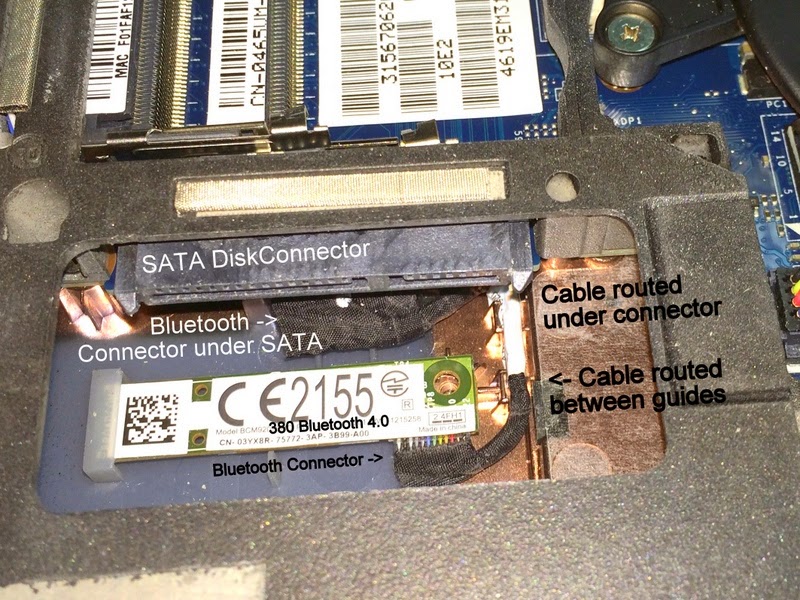
Adding a Bluetooth adapter to a Dell E6430

Image
My Dell outlet site E6430 didn't come with a Bluetooth adapter or the cable to attach it.  Dell offers their 380 which supports bluetooth 4.0 LE.  You can go to EBay to purchase the parts.  The cable is kind of rare and surprisingly pricey. I have found in the past that the Dell parts department will often beat Ebay especially for slightly older or refurbished parts.  It has always worked out well for me.  Go to their parts website and start a chat session with a Dell representative.  They can sell you parts that do not show up on parts / accessories site.  Dell used to have a lot of interesting parts on their web site.  They seem to have pulled a lot of that off the public facing site so you're best bet is to use a chat session or call the toll free number.  My total cost was $24.35.  You need the following to do an upgrade: Dell 380 Bluetooth Adapter part number 3YX8R .  It cost me $9.99. Dell E6430 Bluetooth cable part number ...

A quick jni4net performance hack

jni4net is a great library that creates Java proxies for Microsoft based C# libraries on the Windows platform. It makes Java JNI easy with good performance.  You follow this processes to use jni4net Create your C# library Run proxygen to generate Java native library source code and C# adapter source that shims in between Java and the original library. Run javac to compile the java code Create a jar file of the compiled java code Run the .Net csc.exe that comes with the default .Net installation to compile the C# code Create a new DLL of the just compiled C# code Create a Java program that uses the new generated Jar file, the generated C# dll and the original C# dll. I found a quick hack that improves the performance of the jni4net bridge that involves inserting a line of code in each generate C# method. This hack improves the Java-to-DLL call time only.  It does not impact the performance of the Java code on one side or the C# code on the other.  It lowers th...

Java API Wrapper for Windows Performance Counters

Now its time for a quick overview of the Java wrapper API for the Windows Performance Counters. Lifecycle  System Preparation  Library Initialization Counter Caching  Key Retrieval  Counter Usage Time Based Operations Related Posts Lifecycle The lifecycle for these counters is pretty straightforward: System Preparation: creation of counters in the Windows OS. Library Initialization: loading and initializing the library inside your running program Counter caching an optional step that warms up the counter library Key retrieval for any counter you use Counter usage including the API System Preparation You must create any custom counters as Administrator before running any program that uses the Performance Counter system. The simplest way to do this is in a Powershell script because Powershell is available on all modern Windows operating systems.  The following sample script creates a new Category " Freemansoft.JavaTestCategory" and two s...