Posts

Extremely Rough Cut at C# based IOIO Library
Image
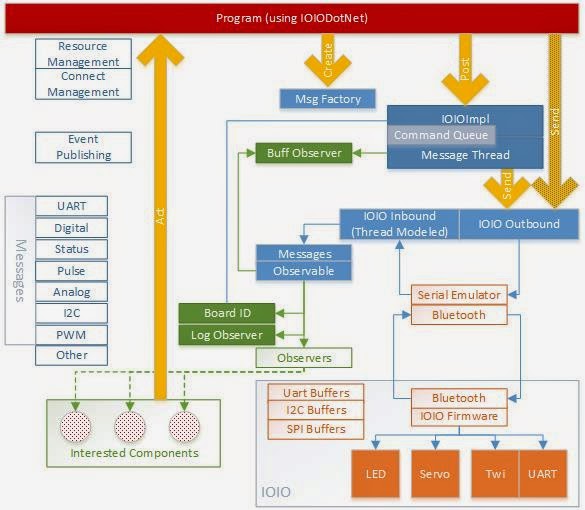
I've pushed a very rough C# port of the Java IOIO library to GitHub github.com/freemansoft/IOIODotNet/   It communicates with the IOIO as a COM device over Bluetooth. IOIODotNet is a plain old Windows Library. I tried making it a Portable library but .Net portable libraries to don't support Serial devices. The library is a mess of pieces-parts right now with some unit tests that show how it works. There is also a WPF app. Tests and the WPF app poll serial ports to find a Bluetooth attached IOIO. This is a message based API Inbound traffic packed into messages and  routed to inbound handlers. You can add your own or you can poll the ones that exist. Outbound traffic can be sent directly via the API or through a message based API.  I intend that the Message API is the future of the library once resource management has been added. Look at the Integration tests to play with it. They expect at least one IOIO V5xx on a COM port with pins 31 and 32 tied togethe...

log4net configuration with MSTest and Visual Studio 2013

Image
I use log4net because it gives me easy class level control over logging levels and it has a lot of outbound (appender) types.  Folks that dislike log4net will not find this post useful. Visual Studio test output can be pretty confounding. There are way to many forum discussions around viewing test logs in Visual Studio. It sort of makes sense because some of the normal logging channels don't make sense in the test environment.  Phones, web apps, console apps, services all log in different environments.  The Visual Studio team changed the location of the logging views in VS2013 (or possibly 2012). Here is my "how did I do that last time" version of configuring log4net logging for unit tests.   Viewing Test Output Visual studio has an Output  window and an Immediate  window buty my output never shows up in either. I've tried routing the console output to the Immediate  window via the preferences. My output never shows up there. It seems l...

Energia: Code on a Timer with Tiva / Stellaris Launchpads

Image
Do you wish you could smoothly fade LEDs without having to code that into the main loop of your program?  Do you wish you could sample sensors or input ports an a regular basis while doing other activities in the main part of your Energia program?  Are you looking for simple ways of creating periodic activities without having to worry about timing loops or how long other processing takes in your loop() function?  If so, then you want to use a timer interrupts! This post describes how to run time based code in a Tiva/Stellaris Launchpad with 1ms precision. The same code runs on the MSP430 Launchpad with 2ms precision. Your function will be invoked at the interval you register without having to integrate any code in your run loop. The timer is in github along with a simple blinking light demo program. Usage AnyMsTimer calls a function()  on regular intervals independent of work you are doing in the the loop() function or the functions it calls. Register...

Web Integration and BDD testing with Selenium, Specflow and MSTest

I occasionally participate in a workshop the LitheSpeed folks where we teach Test First Development using standard unit tests and Business Driven Development using Gherkin.  C# and Java developers participate in a mixed class. The first set of labs involves building a library first using developer style unit tests. The second set of labs involves building a library using BDD techniques.  The class wraps up with building a BDD style set of tests against an existing web site. I've created a small shell project on GitHub that contains both a basic Selenium unit test and a basic Specflow driven BDD style Selenium test. This makes it easy to start testing without the overhead of creating a new VS solution.  I built this project in VS2013 which has good NuGet, Specflow and Selenium plugin and Nuget support. The project uses NuGet Package Restore  to pull down the necessary dependencies in an almost Maven like fashion . The Selenium Web Testing development team co...

Building a development cloud using nested virtualization.

Image
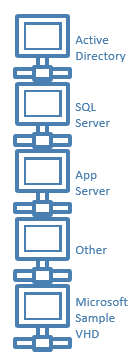
This article is not for you if you are happy developing/testing with at most two machines, your developer machine and a machine under test.  It is not for you if you do all your product evaluation, training and test can only be done in Azure or some other cloud environment that doesn't support nested virtualizaiton. This is really about building your own virtual labs or data centers to simulate larger installations or to use as training environments.  Microsoft applications or machine clusters often include Active Directory, a database and some application servers. You can some times install all this on single machines.  Multiple machines make sense if you are working on clustering or wish to leverage portions of your setup for future projects. Microsoft often provides VHDs for some of their more complicated products that save you configuration time. These machines are often more interesting when integrated into to some type of application including AD databases or...

Using files with embedded Mule Expression Language for better looking HTML

Image
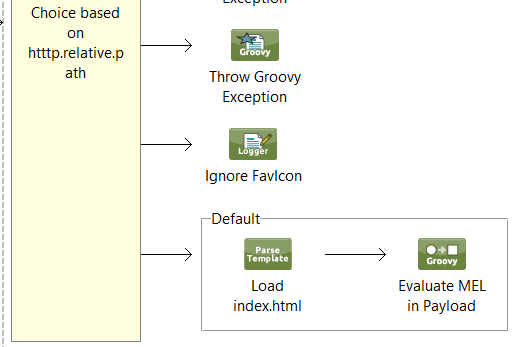
Our team returns a HTML home page  when anyone makes a GET request at the root of our API or monitoring web endpoints.  This  service help page includes a combination of static and dynamic content. We struggled building decent looking pages until we started using the Mule Parse Template  component and groovy component that invokes the Mule Expression Language (MEL) processor against the markup. The example to the right shows how our  default  behavior in a our web choice router processes a web template. Sample Code You can find sample code in the Coda Hale exception metrics counter demo on GitHub Parse Template The Parse Template  component loads a file into the Mule payload. You can use this to return any raw file to the caller based on the request path. This lets you return html, css or js type files from iniside your application.  We will use this feature to load an HTML file into the payload that includes embedded MEL.  The...

Capture and expose system exception statistics in Mule using Coda Hale Metrics

Image
This article describes how to use the Coda Hale metrics library to capture the counts and types of system exceptions thrown outside of Mule ESB flow processing.  Historical exception information is exposed via JMX or written to disk using CodaHale reporters as described on the CodaHale metrics web site . You can use this same technique in any Java application.  We inject instrumentation at the system context level.  That component converts the wrapped exception stack to a counter name that is then created and incremented in the Coda Hale registry.  I use the simple running counter because I don't find the native Coda Hale histogram data useful for this type of metric. You can use other metric types if you want more complex statistics. Components We use 2 injection components 2 codahale components and a custom listener  to make this work: MetricsRegistry:  A CodaHale singleton that maintains a reference to all statistics. It is injecte...

Capture and expose flow exception statistics in Mule using Coda Hale metrics

Image
This article describes how to use the Coda Hale metrics library to capture the counts and types of exceptions thrown as part of Mule ESB flow processing.  Historical exception information is exposed via JMX or written to disk using CodaHale reporters as described on the CodaHale metrics web site . You can use this same technique in any Java application.  We add an instrumentation component to each mule Exception Flow.  That component converts the wrapped exception stack to a counter name that is then created and incremented in the Coda Hale registry.  I use the simple running counter because I don't find the native Coda Hale histogram data useful for this type of metric. You can use other metric types if you want more complex statistics. Components We use 1 injection component, 2 codahale components and a custom flow component to make this work: MetricsRegistry:  A CodaHale singleton that maintains a reference to all statistics. It is inject...

Windows 8 tablet (battery) dies in 2 days because of Instant-On

Image
I have a Windows 8 / 8.1 TW100 10" quad core tablet that leave at work as an inexpensive internet device.  The device is always dead with 0% battery when I arrive at work Monday morning. The thing has good battery life when I'm actively using it.  I have to charge the device and reset the clock every Monday. (The clock is dead because it relies on the main battery as the clock battery).  My IPad 2, by comparison, sits standby for days/weeks without draining the battery. The TW100 uses Microsoft Windows 8 new Instant-On or Connected Standby to stay connected to the internet. This new SoC compatible standby mode uses a lot more energy than the standby on other tablet.  Note: This tablet has no applications installed. You can use the "powercfg" command to analyze battery usage. It generates a nifty HTML file that describes battery usage across the last 3 days. powercfg sleepstudy  This chart shows the continual power drain on this tablet across the week...

Why does my Windows 8 (8.1) tablet have only one power plan?

Image
I recently purchased a quad core Winbook TW100 Windows 8 tablet, similar to the TW801. The tablet gets OK active battery life running for 5 hours. It doesn't last as long on standby as I expected. It is often dead when I pull it out my backpack for a couple days. Microsoft Windows uses "power plans" to manage the power consumption of windows based devices.  Power plan options that let the user trade off performance versus power consumption. It turns out this is related to the way windows 8/8.1 manages power  for tablet and other always connected  devices using a feature called instant on  or InstantGo . These devices come with a single power plan and new sleep modes that are tightly integrated with the tablet/PC specific hardware.  The Windows Power Options panel shows only the Balanced  power plan as seen in this image. This  feature,  implemented by Tablet OEMs, lets Windows tablets / PCs wake up / receive notifications and other network t...