Posts

Quality is day 2 - the day that never comes
Image
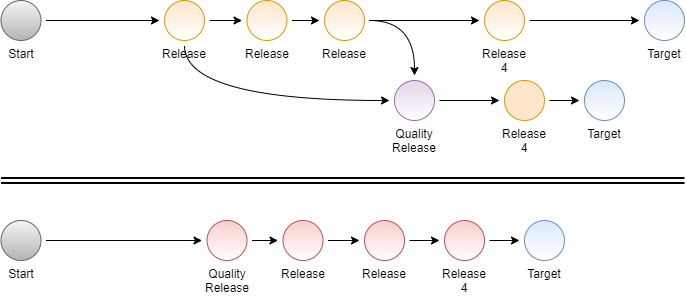
Quality has to be baked into the decision-making process from the beginning of any effort. We often talk a good game about making sure we improve the quality of a product or process at "some time in the future" or "in the 2nd release". We hear this a lot in the crunch period at the end of a project. The date or some features trump repeatable process or quality efforts.  The next iteration is filled with "must-have features".  Day 2 turns out to always be the next release, next quarter, or never. Baking corner cutting into the process Some groups just own that they will produce junk and build stabilization sprints  and quality increments  into their process. They schedule specific periods for additional testing and QC.  I've seen this work and I've seen it become a major anti-pattern where teams get even sloppier because they know there is a quality improvement phase. Immediate payof...
Casually measuring disk throughput with antimalware enabled and disabled

Image
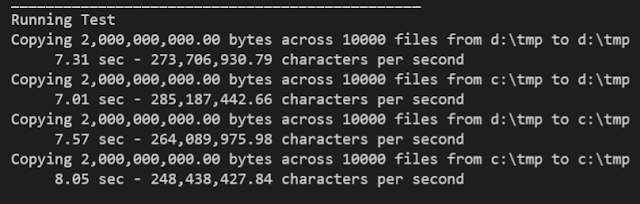
I wanted to test the relative performance of two drives on a Windows 10 machine and get a feel for how much overhead my anti-virus products cost me.  To that end, I created a program to copy in different combinations between the two drives.  I ran that test with different Anti-Malware versions and configurations  From the README.md on GitHub The Program 1. It takes the names of two directories 2. It creates the number of files that you specify of a size you specify in both of the directories passed in.     1. You want big numbers for both.  The default is 10,000 files of 200,000B each. 3. It copies the large number of files in the 4 possible source/destination pair combinations. 4. It writes the timings to the console and deletes the test files. In my case I ran a couple different variations to see what was happening 1. Drive A anti-malware enabled .  Drive B anti-malware enabled 2. Drive A anti-malware enabled .  Drive B anti-malware disab...

Looking for E-Mail recipients from all the wrong places.

Image
Sometimes we need to understand everyone who has been in our email chains across some period of time. We need to collect all the recipients in a group of emails into a form they can be analyzed. Our program reads a date range of emails from an IMAP mailbox and then Extracts the Sender, To, CC, BCC, From, Reply-To  Extracts the message-id and Subject line Creates a combined list of the unique email addresses from the 6 fields above. Filters the combined list to remove any trusted addresses or domains. Writes out a CSV with those 10 fields. The original purpose of this program was to see if unwanted parties had inserted themselves into any email threads over some period of time. Code This simple python program extracts recipient information from mailboxes and writes it to CSV files. The program can also ignore trusted addresses or domains.    https://github.com/freemansoft/email-address-analyzer-python Video A quick overview of the program  Creat...

What are we running and how do we know it?

Image
Modern software systems can be complicated with many moving parts.  Each of those parts can be updated, upgraded, or changed at any time.  We need the ability to understand which versions of each component or configuration are running in each environment at any time.   Smart designs, automation, and the appropriate metadata can set us up to understand the specific configurations and versions in each layer in every environment. We will attack this problem in the static / design phases and the dynamic run time phases. What versions do we have available? What versions are we running?

Understanding your WSL2 RAM and swap - Changing the default 50%-25%

Image
The Windows Subsystem for Linux operates as a virtual machine that can dynamically grow the amount of RAM to a maximum set at startup time.  Microsoft sets a default maximum RAM available to 50% of the physical memory and a swap-space that is 1/4 of the maximum WSL RAM.  You can scale those numbers up or down to allocate more or less RAM to the Linux instance. The first drawing shows the default WSL memory and swap space sizing. The images below show a developer machine that is running a dev environment in WSL2 and Docker Desktop.  Docker Desktop has two of its own WSL modules that need to be accounted for.  You can see that the memory would actually be oversubscribed, 3 x 50% if every VM used its maximum memory.  The actual amount of memory used is significantly smaller allowing every piece to fit. Click to Enlarge The second drawing shows the memory allocation on my 64GB laptop. WSL Linux defaul...

What are we running - API changes expressed as versions

Image
What API version is out there and how do we know it? The software world is continually moving along the path to more API-driven solutions in an attempt to break down monolithic software systems into more manageable size pieces.  We stitch together business processes with a collection of synchronous API endpoints, asynchronous messages, and massive event streams.  Every one of these connection points is a data and behavior contract that can be changed every time one of these endpoints is updated or upgraded.  Today's agile means that the individual services change often and at a rate decoupled from the API consumers.  We need to apply software engineering discipline to capture the changes and make it possible for our consumers to know which version they are talking to. Video Part 1 Change Types and Scale, Synchronous/Asynchronous APIs, Design Time vs Run time Considerations Part 2 Run Time versioning options for consumers and operations ...

What are we running - Tagging infrastructure in Azure

Image
Asset Tagging is one of the best ways for providing run-time compliance and versioning information in cloud-based resources.  All of the major cloud providers provide the ability to annotate cloud resources with custom tags.  We reliably version/tag cloud resources if we follow the  Infrastructure as Code philosophy.  All our infrastructure is created using scripts that call cloud APIs, or resource templates that can be loaded by cloud APIs. Infrastructure versioning has both design time and run time components. The design-time pieces come into play at build and packaging time and when deploying.  The run time component is what lets us interrogate the component or the cloud metadata around that component.  Video Design-time infrastructure versions with IaC IaC uses code or configuration files to drive provisioning. Those files can be checked into source code management systems where they can be branched and versioned like any other code. We can always qu...

Make Azure learning credits visible in the coffee shop domain

Image
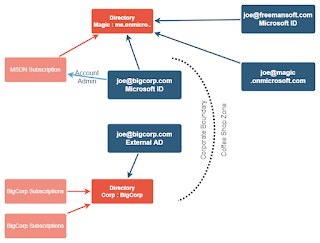
The Microsoft Accounts mess can make it hard to use your Azure credits that come bundled with MSDN/VSOL. You  can end up with two accounts with the same name, one work/school in your corporate domain and one personal  Microsoft ID outside the corporate domain.  Enterprise users run into this when they want to learn in Azure using their Corporate MSDN Azure credits. Both accounts have the same email domain which means they both have corporate accessibility zone restrictions even though the two accounts are not connected in any way and have no way of seeing each other's resources. We can share this subscription with your personal, non-corp domain, account or create an ID that only exists in the ID that is tied to the subscription.  This lets you learn Azure  while sitting at home or the coffee shop.  This blog assumes you are allowed to use your Azure credits for your education from personal gear.  If not, then stop here. Video Discussion Initia...

Azure Active Directory - Tenant basics I never knew

Image
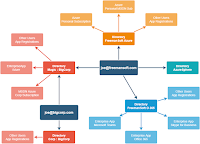
Azure Active Directory has always been sort of  just there .  I've never paid any attention to the concept of Azure Active Directory tenants until last week. Azure AD was just an idea when we first started our Azure work 8 years ago. There were all kinds of "you can't do that in Azure AD" wrappers around it back then. Azure AD has grown in flexibility. Now it is time to look at the multi-tenancy aspects of Azure AD. You can spend years in Azure without running across the tenancy.   Got a personal Azure account?  One tenant is plenty.   Got an MSDN Azure subscription tied to your account? One tenant is plenty.   Working in a corporate environment where some other group manages AD and provides your subscriptions?  One tenant might be all you ever use. We can walk through an example account to get a better understanding of Azure AD tenants why we might use them. Video Azure AD Ten...

Four faces of software reuse - Greatest strength is its greatest weakness

Image
We have four major patterns for reusing software and code. They each have their own advantages and disadvantages. This will be another demonstration of how an approach's greatest strength can also be a weakness of that approach. We will cover copy/paste, shared library, mono-repo internal library, and shared services. Today's pattern is tomorrow's anti-pattern.