Posts

Get a better understanding of your Flutter Riverpod dependency graph with the riverpod_graph markup generator

Image
Pictures make it easier to understand how an application is wired together.  This is especially true if your application is reactive with different modules listening for changes and making data changes.  Riverpod has a graph generator that can show you how its providers are wired together. Opt 1: Use a checked-out copy of the Riverpod GitHub repo I generated the following diagram for the example todos application using these riverpod_graph  commands. They assume that I have the Riverpod git repository checked out and that I am in a terminal sitting in the root of the repository.  The riverpod_graph command accepts the analysis target root as a parameter. I explicitly specified the lib directory here to make sure we didn't pick up any dependencies on utilities or tests. This approach makes sense if you think you want to work on the riverpod_graph project or that you always want the latest from git and don't want to remember to activate later versions. mermaid.js forma...

The unfortunate result when a corporate goal is shortened to be conference room names.

Image
Are there topic restrictions when meeting in this room?

When music loving engineers are allowed to name conference rooms

Image
 I like this conference room because it is technical humor without involving stereotypical nerd culture, Revision History Created 2023 07

Flutter Cupertino and Material or Fuchsia APIs are different enough to require switches or wrappers for the native look and feel.

Image
Flutter lets you write once and then run anywhere with the native look and feel.  It turns out that getting the native look and feel on mobile devices means using Flutter platform-specific libraries that expose the platform differences. Users expect platform-specific behavior, especially on mobile devices. You either bury switches everywhere in your code or you wrap them. This includes a demonstration of the Material and IOS date pickers and a wrapper that hides their differences from the rest of your code.   References YouTube walkthrough Flutter device Widget wrappers - You'll be wrapping IOS, Fuchsia, and Material widgets everywhere. Code Samples  https://github.com/freemansoft/Flutter-AdaptiveCards Strategies There are really three main strategies for handling mobile device native behavior. Ignore native behavior:  Pick a single interface standard, say Material  in flutter, and force all the users to use it no matter what type of device they have....

Prusa 2.6 3D Slicer demonstrates the power of open source contributions - tree supports

Image
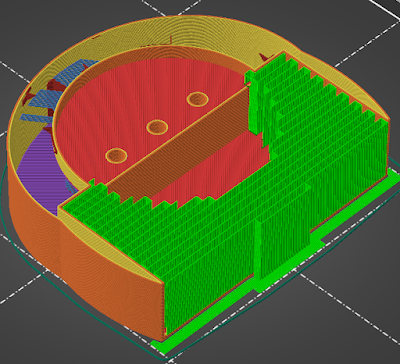
Prusa Slicer is another fantastic example of the strength of open-source software .  The Prusa Slicer 2.6 release showed out-of-the-box thinking that can significantly impact 3D print times and simplify trimming and post-processing. My favorite new feature is tree supports  where the program takes an intelligent approach to building supports for overhangs and spans that are too big to be printed over nothing but air . Video https://youtu.be/2JBIeFagYnQ 3D Model Used Mason Jar lamp on Thingiverse Supports Prusa Slicer 2.5 supported the printing of removable supports when rendering longer spans over open spaces.  The molten filament will droop as it crosses from one support to another. The best practice guidance is to use supports  for any angle over 45 degrees. The green zig-zag is the removable support material. They are dense and can be difficult to remove. The end result is that the final print can have a lot of places that may need minor touchups. The zig-zag ends...

The Internet mall idea boomed then died and then Amazon and Alibaba grew up

Image
At the beginning of the Internet, people envisioned a shopping mall.  They had no e-commerce experience or history. The technology was too low bandwidth to deliver today's experience. Pictures and catalog content had to be delivered  "overnight"  to potential customers if you wanted an actual  catalog  experience. The analogy broke down due to technology and the unfettered access customers had to any website. MCI wanted to build an Internet Mall at the dawn of the Internet era.  They and everyone else knew that shopping would be big on the Internet and they envisioned that they could manage the mall front and that companies would lease space on the mall website. The technology was limited so the thing would only work if people would leave their computers on at night to download product catalogs. The project product people used analogies and patterns they were comfortable with when putting together proposals. The development team was pretty vocal that the in...

A simplified version of Kubernetes Network for developing on Windows and WSL and Docker Desktop

Image
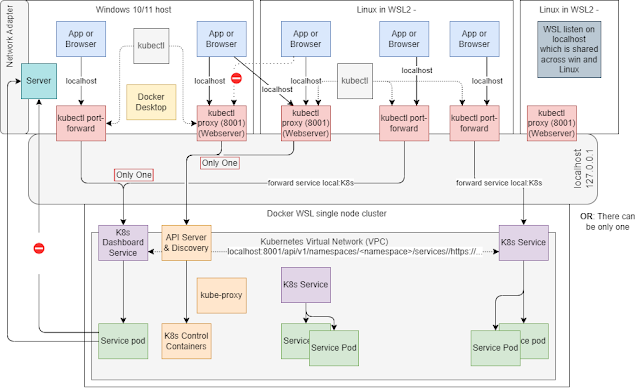
Pictures always help. We can use this one to put together a basic description of how the Windows, WSL2 Linux distributions, and Docker on WSL and Kubernetes talk to each other over localhost. We’ll cover why you got to do things like port-forwarding or proxy with a Kubernetes network. There is asymmetric behavior between the different components. I'm sure somebody knows the magical explanation.  Click to enlarge Video Walkthrough Magical localhost networking with Docker WSL2 Windows and Linux Heavily Edited Video Transcript You have a Windows host with its ethernet adapter. Each Linux WSL2 instance has an eth0 network adapter. The Windows host and WSL instances are attached to a private network on the Ethernet Switch (WSL) Then you have the localhost adapter. WSL makes it look like localhost is visible to all WSL instances and to the Windows host.  A port on WSL2 127.0.0.1 is also available on any other WSL2 instance and from the Windows host all on 127.0.0.1.  ...

Address Pools and Interfaces for Docker and WSL and Windows

Image
Docker Desktop and WSL2 integration on Windows 10/11 "just works" in many situations but feels like magic. I needed a map of the networks and names to understand why I needed proxies, port forwarders, and projected ports. May this be useful to you also :-) The Windows 10/11 machine in this diagram is known as Z820. This diagram is an outside-looking-in topology. There are multiple networks and different name resolutions for the same names depending on where you are in the network. In some places, the same hostname is resolved to different IPs if you use DNS vs the host table, /etc/hosts Click to Enlarge This diagram is a simplified version of the previous one with the WSL network and associated Linux installations removed. Click to Enlarge Video YouTube Windows WSL2 Docker Node Pool and Desktop Networks and Names The Six Networks in this diagram The network IP ranges in the diagram above are those of the default Docker / WSL installations and can be adjusted via various mech...

A bank CIO once told us every project was on time or coming in early

Image
I worked for a vendor at a bank in the early 2000s. We raised the issue of how many programs and projects were off-course in an already-planned meeting with a CIO. The CIO said we were off base and that  We have 320 software projects in flight - 315 on time - 5 will be early The reality was that everything went to production in Q4. The next year's Q1 was filled with production fixes. I'm pretty sure the real story was Real-time information radiators have given a different impression Question Did the executive know what was happening but was defending their teams? Was the true health hidden from the executive? Did the company not have accurate metrics? Does anyone believe that all their software projects were on time or early? Maybe they just keep adjusting dates until they are accurate. It was not a feature driven agile shop that delivered incrementally Were bonuses the primary drivers for this viewpoint? Revision History Created 2023 06 

Use Amazon Coretto for OpenJDK Java 8 for Debian Linux like Kali - other version too

Image
Linux package repositories often only hold the latest LTS versions.  You have to look elsewhere if you need something like Java 8.  Look to Amazon Coretto if you want specific versions of Java installed on your Linux instance.  Amazon maintains Corretto distributions going back to Java 8 when checked at 2023 06. Debian, Ubuntu, Kali, etc. Users can add the Corretto repository to their instances and then install specific OpenJDK versions using standard apt . Installation Partially derived from https://docs.aws.amazon.com/corretto/latest/corretto-8-ug/generic-linux-install.html The Corretto install instructions assume you have add-apt-repository  installed.  So install add-apt-repository sudo apt update sudo apt install software - properties - common Add the Corretto repository wget - O - https: // apt.corretto.aws / corretto.key | sudo apt - key add - sudo add-apt - repository 'deb https://apt.corretto.aws stable main' Install Java 8 Corretto sudo apt - get up...