Posts

AWS EBS storage balancing size versus throughput

One of my teams is rolling out a new application in AWS on EC2 instances where the operating system runs on an EBS drive. We selected one of the M3 machines that came with SSDs.  The application makes moderate use of disk I/O.  Our benchmarks were pretty disappointing. It turns out we really didn't understand what kind of I/O we had requested and where we had actually put our data. The Root Drive The root drive on an EC2 instance can be SSDs or Magnetic based on the type of machine selected. All additional mounted/persistent disk drives on that machine will probably be of the same type.  This is an SSD but it is a network drive.   EBS disks IOPS and MB/S are provisioned exactly as described in the EC2 documentation.  The most common GP2 SSDs have a burst IOPS limit and a sustained IOPS limit. They also have a maximum MB/S transfer rate.  Both the sustained IOPS limit and the maximum transfer rate are affected by the size of the provisioned disk. ...

An Environment for Every Season

Image
Video Presentation This is really talking about different types of software environments and how they are used during the various phases of software development, integration, and support.   Environments are the touchpoints between your system and other teams operating on their cycles and timelines. They configuration tuning points where control is incrementally applied or where access is restricted based on the sensitivity of the data in that environment and its distance from production or development. System Complexity The number of system environments (sandboxes) required depends on your system complexity, your tolerance for defects, your level of Ops and DevOps automation, and the needs of other systems that yours integrates with. This diagram shows a couple application components that integrate with 4 different partner teams and 3 data stores.  Each partner team has its own release cycle and testing needs. We aim for loose testing coupling but that is often imposs...

The Cloud is an Opportunity

"Excellence is a continuous process and not an accident" A hybrid cloud is just an offsite data center if you migrate your applications and processes as is . This Topic on Video Cloud as an Opportunity Life in the Cloud Should Be Different  Opportunity to bake in policies and practices Full automation is possible and required to feed continuous processes Continual building and destruction of infrastructure is desirable over stale configurations Dynamic and on-demand capacity is available and should be leveraged It is easy to isolate teams, applications and partner firms using built in tools. Resiliency must be part design and not an afterthought. A cloud migration is an opportunity to bake in  policies and practices that were impossible in your previous environments.   It is an opportunity to leverage cloud vendor provided security, automation and pre-built services in a way that increases your team's capabilities.  The cloud lets you automate y...

Thinking Putty in the Cube Farm: free range or caged

Image
Various companies like Think Geek and Crazy Aaron's  sell palm sized blobs of  "Thinking Putty" as a thinking aid, as a form of stress relief and as nervous energy sink.  Once released into an office, you will find people subconsciously picking up their putty to pull, knead, squeeze and fold it while working on projects or while in discussion. Putty has some odd properties.  It can be squeezed and shaped. It can also bounce like a rubber ball. It is solid but acts sort of like a very thick liquid.  Sculptures made out of the putty start slumping immediately and end up as a pool of putty within hours.  Putty can be pressed and worked but can also be torn as if it is a solid. Putty, comes in fun  colors with and effects.  It can be plain, UV sensitive, glow in the dark, magnetic and heat sensitive.  The can at the right is heat sensitive, changing color from orange to yellow when warmed by friction, body heat or by some other heat source. ...

Received and sent messages in a single mailbox with MS Outlook for OSX

Image
Microsoft Outlook for the Mac and PC behave differently when showing conversations in the Inbox. The PC shows received and sent messages. The Mac shows only the received messages.  There is no default way to show a threaded conversation on Mac Office 2016. Microsoft Outlook for the Mac is integrated with OS/X spotlight search so that AppleScript and Spotlight can be used to create Outlook  Smart Mail folders. Smart Folders  are more like views into mailboxes than actual mailboxes. They are virtual folders that are created from the results of a search.  This blog leverages Outlook's raw search  capabilities that come from OS/X integration.  You can find out more information about this integration on the Microsoft answers web site . Portions of this blog came from this excellent blog posting . Identify Mailboxes to be included in Smart Folder Our conversation SmartFolder is made up of the contents of the Inbox and Sent mailboxes. We first need to ident...

Almost PaaS Document Parsing with Tika and AWS Elastic Beanstalk

Image
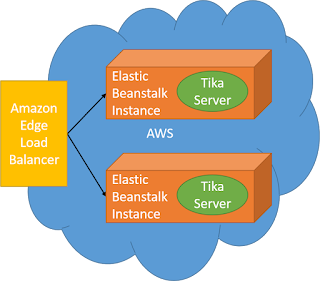
The Apache Tika project provides a  library capable of parsing and extracting data and meta data from over 1000 file types.  Tika is available as a single jar file that can be included inside applications or as a deployable jar file that runs Tika as a standalone service. This blog describes deploying the Tika jar as an auto-scale service in Amazon AWS Elastic Beanstalk.  I selected Elastic Beanstalk because it supports jar based deployments without any real Infrastructure configuration. Elastic Beanstalk auto-scale should take care of scaling up and down for for the number of requests you get. Tika parses documents and extracts their text completely in memory. Tika was deployed for this blog using EC2 t2.micro instances available in the AWS free tier. t2.micro VMs are 1GB which means that you are restricted in document complexity and size. You would size your instances appropriately for your largest documents.   Preconditions An AWS account. AWS ac...

Slice Splunk simpler and faster with better metadata

Image
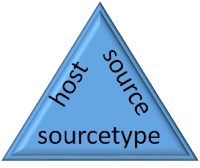
Splunk is a powerful event log indexing and search tool that lets you analyze large amounts of data. Event and log streams can be fed to the Splunk engine where they are scanned and indexed.  Splunk supports full text search plus highly optimized searches against metadata and extracted data fields.  Extracted fields are outside this scope of this missive. Each log/event record consists of the log/event data itself and information about the log/event known as metadata.  For example, Splunk knows the originating host for each log/event.   Queries can efficiently filter by full or partial host names without having to specifically put the host name in every log message. Message counts with metadata wildcards One of the power features of metadata is that Splunk will provide a list of all metadata values and the number of matching messages as part of the result of any query.  A Splunk query returns matching log/event records and the the number of records in e...

Enabling Microsoft Application Insights for Mule ESB monitoring

Image
Microsoft Azure Application Insights requires Mule 3.7 or later. Application Insights depends on org.apache httpclient and httpcore versions that are first bundled with Mule 3.7 Application Insights is an Azure based application performance dashboard that can monitor applications deployed inside, or outside, Azure.  Application Insights SDKs are available for a variety of languages with a heavy focus on standard library web driven applications or services. This blog entry describes how easy it is to enable Application Insights for a Mule ESB application that does not use any of the out-of-the-box supported web hooks. In this case, we monitoring the out-of-the-box JMX beans provided by Mule. Performance information is gathered by Application Insights where it is displayed in the Azure Portal. Mule exposes performance data about applications and flows via JMX.  Any of this can be forwarded to the Application Insights Dashboard. Steps Create an Application Insights...

Enabling Microsoft Application Insights for JMX monitoring of a Spring wired Java application

Image
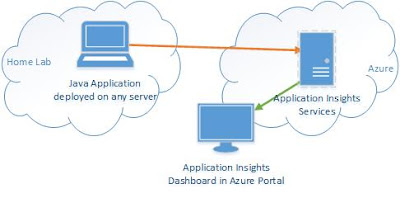
Application Insights is an Azure based application performance dashboard that can monitor applications deployed inside, or outside, Azure.  Application Insights SDKs are available for a variety of languages with a heavy focus on standard library web driven applications or services. This blog entry describes how easy it is to enable Application Insights for a Spring wired Java application that does not use any of the out-of-the-box supported web hooks. In this case, we are enabling Java / JMX monitoring of a custom Spring application running in my home lab. Performance information is gathered by Application Insights where it is displayed in the Azure Portal. I did this work as part of building a message driven application that had no true web interface. The application runs in a container that does not support tomcat or web filters normally used to enable Application Insight. Microsoft does a good job of describing how to monitor Java Tomcat, Struts, Spring MVC and other sta...