Posts

Showing posts with the label Bootcamp

Cloning a Mac / Bootcamp disk to a larger drive

OWC and others recommend that you do a fresh installation when moving a Mac with Windows BootCamp to a larger drive.  That is probably a good idea. Sometimes you just decide to do things the hard way. This is what I did for my Macbook Air when I bought a larger SSD.  It had OS/X on the first partition and Windows 7 on the second partition. Backup your data. Create a Clozilla bootable thumb drive. Get an OWC drive with external case. Plug in the new drive in the external case. Boot Clonezilla from the thumb drive.  Clone the internal disk to the new, larger, external disk. Make an exact copy of the disk using Clonezilla. This exact copy will not make use of the full drive. Power off the machine Remove the old disk.  Install the new disk inside your machine. Boot into the mac OS on the disk you just installed. Move GPT bookkeeping data to the actual end of the disk. Download and use gdisk to copy the MBR/GPT info to the end of the new drive. You ma...
Importing a bootcamp partition into VMWare Fusion when it has Hyper-V enabled.

Image
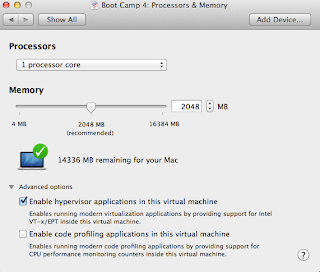
This is quick note on importing a Windows 8 or Server 2012 BootCamp partition that had Hyper-V hypervisor enabled. By default, you cannot have Hyper-V booted inside of Fusion because of hardware vitualization conflicts.  You know you have this problem if you see the following messages in the guest machine's window in VMWare Fusion. Your PC ran into a problem and needs to restart.  We're just collecting some error info, and then you can restart. (100% complete) If you'd like to know more, you can search online later for this error:  SYSTEM_THREAD_EXCEPTION_NOT_HANDLED (winhv.sys) Edit the Fusion VMX configuration file directly. You can fix this by editing the vmx file directly. Shutdown Fusion Find your Virtual Machine definition. Navigate to /users/<username>/Library/Application Support/VMWare Fusion/VirtualMachines/Boot Camp . Right Click on the Boot Camp package and select Show Package Contents Edit the file that ends in .vmx  using TextEdit o...