Posts

Showing posts with the label VMWare Fusion

Quit worrying and love VMs and Containers

Image
Did you ever wake up, look at your development box and wonder "when did that happen"?  I've started using Docker for deployed services like databases, messages brokers etc.  At the same time, I've been trying to use Kali Linux for hackathons and general security work.   Windows gaming, my pathetic mobile efforts and windows docker development are done using Windows 10.  Windows must run under a Hypervisor or as a dual boot.  That is how you end up with three hypervisors, three operating systems and two docker environments on the same machine. The following diagram shows the underlying complexity of all this. Hypervisors in action HyperKit on OS/X:  Docker for Mac desktop runs docker containers inside a HyperKit virtual machine that leverages the Mac OS/X Hypervisor.framework.  Docker named drives live inside this virtual machine. VMWare Fusion on OS/X:  VMWare Fusion can host Windows and Linux virtual machines. Fusion suppor...
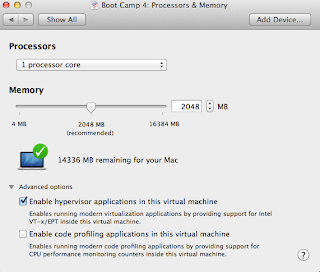
Importing a bootcamp partition into VMWare Fusion when it has Hyper-V enabled.

Image
This is quick note on importing a Windows 8 or Server 2012 BootCamp partition that had Hyper-V hypervisor enabled. By default, you cannot have Hyper-V booted inside of Fusion because of hardware vitualization conflicts.  You know you have this problem if you see the following messages in the guest machine's window in VMWare Fusion. Your PC ran into a problem and needs to restart.  We're just collecting some error info, and then you can restart. (100% complete) If you'd like to know more, you can search online later for this error:  SYSTEM_THREAD_EXCEPTION_NOT_HANDLED (winhv.sys) Edit the Fusion VMX configuration file directly. You can fix this by editing the vmx file directly. Shutdown Fusion Find your Virtual Machine definition. Navigate to /users/<username>/Library/Application Support/VMWare Fusion/VirtualMachines/Boot Camp . Right Click on the Boot Camp package and select Show Package Contents Edit the file that ends in .vmx  using TextEdit o...

Install a Microsoft Virtual Lab on a Mac with Fusion and Hyper-V

Image
Modified 2013/02/09 to add remote management enablement We're going create a Hyper-V Microsoft virtual lab environment on a Mac with the following configuration as discussed in this previous blog article  http://joe.blog.freemansoft.com/2013/01/run-microsoft-virtual-lab-on-mac-with.html .  We can use the same approach on Linux machine using VMWare workstation / player. Our mini-data center consists of 5 machines. A Windows 2012 Server hosting Active Directory and DNS.  The machine also holds/manages the hyper-v environment used to run the rest of the machines Two Windows 2012 servers to be used as application machines One Windows 2012 server used to run SQLServer 2012 One Windows 2012 server used to run the on-prem version of windows service bus We're not actually going to install any application software in this article.. The basic steps are Install Windows Server 2012 that will be our AD/DNS/Hyper-V host Hack the VMWare/Fusion/Workstation dhcp....

Run a Microsoft virtual lab on a Mac with Fusion and Hyper-V

Image
An integrated Microsoft environment provides a lot of standard infrastructure for your project.  It also requires a certain amount of standard infrastructure irrespective of the size of the project. Active Directory is the most obvious example of this   Developers that want to test out Microsoft tools or sub-systems almost always need a multi-system environment because most  Microsoft products work best when bound to Active Directory, a tool that needs to run on its own system.  Virtualization can help here making it easy to build virtual labs , "personal clouds" or use something like Azure. I've been working on a Microsoft project where all of our virtualization is done using Microsoft's Hyper-V.  This pushes me towards Hyper-V as my virtualization platform when sharing work with others on the team.  My most powerful laptop is my 16GB Quad-Core Macbook Pro.  Hyper-V doesn't run on OS/X so we can instead make use of a technique used by a lot of VMWar...