Posts

Showing posts with the label Events

Microcontroller - service connections and acquisition patterns
Image
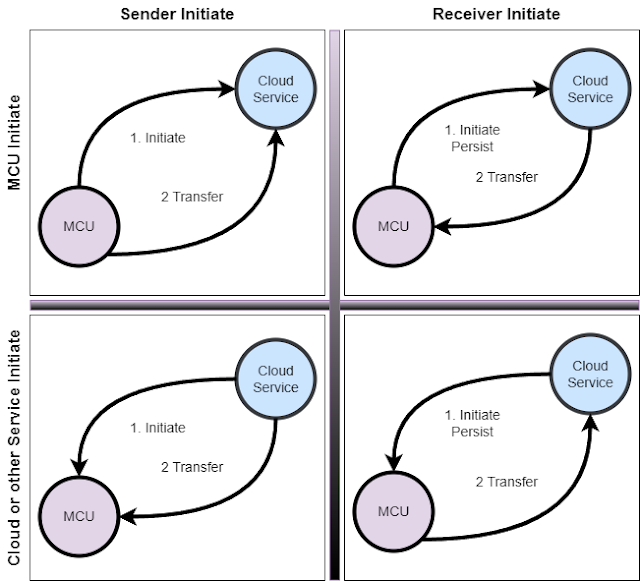
I ended up with some crosscutting content when I wrote up some patterns for getting data onto and off of microcontrollers. The consumption and generation patterns are cross-matched with implementation details.  You may know where you want to send data or in how many directions you want to send data. Now you have other concerns.  Connecting the devices, triggering transfers, and balancing latency with overhead. The next step is to understand how you are going to handle the connectivity and connection initiation.  That depends on the connection types, network topologies, and tools you have.  You then need to figure out how you are going to know when to capture data or receive commands.  Is it time-based or event-based?   Then you need to understand what your payloads look like and balance that against CPU, latency, and other constraints. This was just a subset but should give you the idea. Related Video Moving IOT data onto the controller Moving IOT data...
Patterns for Moving data onto a Microcontroller

Image
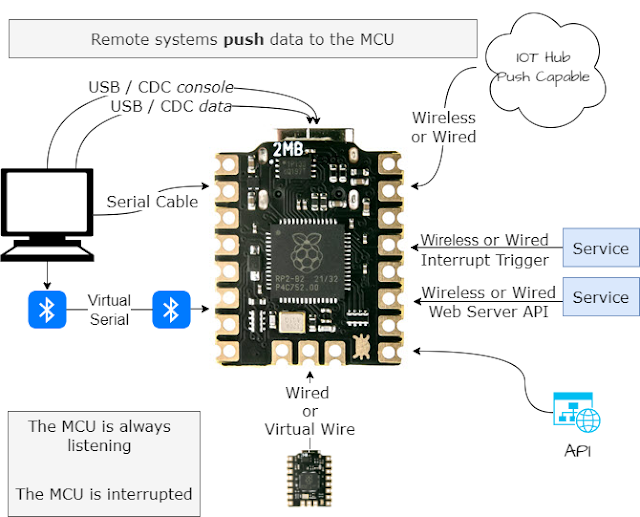
Microcontrollers can operate independently in complete isolation. They can operate independently while sharing data with dashboards or other applications.  They can operate under guidance or based on information provided to them by external systems.  They can coordinate operations with other controllers, or remote applications by passing data back and forth.  Let's break this down and talk about moving information onto an IOT from remote systems or other devices. We're talking about information transfers   from  a microcontroller to  other devices, applications, and data sinks.  Transfers can be   self-initiated  or   externally initiated .  Both approaches have their advantages and disadvantages. Video Moving IOT data onto the controller Moving IOT data off the controller Microcontroller - service connections and transfer patterns Related Blog Articles Patterns for Moving data onto a Microcontroller Patterns for Moving data off of...

Patterns for moving data off of a Microcontroller to somewhere else

Image
Microcontrollers can operate independently in complete isolation. They can operate independently while sharing data with dashboards or other applications.  They can operate under guidance or based on information provided to them by external systems.  They can coordinate operations with other controllers, or remote applications by passing data back and forth.  Let's break this down and talk about moving information from an IOT to remote systems or other devices. We're talking about information transfers from a microcontroller  to other devices, applications, and data sinks.  Transfers can be self-initiated  or externally initiated .  Both approaches have their advantages and disadvantages. Video Moving IOT data onto the controller Moving IOT data off the controller Microcontroller - service connections and transfer patterns Related Blog Articles Patterns for Moving data onto a Microcontroller Patterns for Moving data off of a Microcontroller Microcontr...

Plan ahead for internal correlation and tracing needs

Image
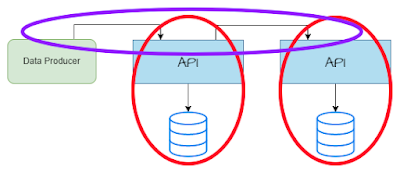
Inter-system and Intra-system tracing capabilities are a must in modern distributed architectures and in systems where dashboards and triage must be done without cracking open the production environment for on-box work. Teams need to understand and verify the lineage of inbound requests that end up in data stores and in outbound calls or notifications to other systems. Lineage and Observability NFRs are the requirement that creates the need for inter and Intra team correlation capabilities.  Everyone should have tracing and monitoring Non-Functional Requirements (NFRs) that describe their observability needs. Those NFRs should describe how a system must support tracking work through a system from the time it enters until the time it transitions to at rest or the time it communicates with other systems.  Teams without these NFRs often end up scrambling to provide production metrics and debugging tools during production events. YouTube Vid...

Event the heck out of it so that you can drive insights and and keep options open

Image
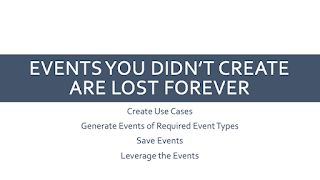
Business and Technical events are an early, easy, way to capture activity, notify other systems of activity, capture technical changes, and log executed business functions. The information needed for those events tends to reside in specific steps in an execution flow. This means we often need to insert event generation probes in multiple places and at multiple levels. Product owners need visibility into any business functions or services that are performed.  Technical teams need visibility into the detailed activities executed in a system.  Partner business functions and data stores need a way to reconstruct the data as it existed at a specific times Databases often only provide a current or point-in-time state.  Logs have PII restrictions. Metrics are statistical by their nature. 

Create a grammar before defining event models

Image
Software systems stream business events to be seen by customers, used by processes, or written to analytical stores.  Sometimes the best way to initiate a design is to create a grammar, a language, that can be used to generate the data models used in the events. Our first step is to define the  grammar or syntax for  Business Events / Audit Messages in a generalized form. We use this grammar to validate design time event definitions. We can implement that grammar in whatever technology we choose. Business Events are different from technical events. Programs and subsystems generate technical events about invocation and process failure events.  Technical events are targeted at production support, system triage, and data store replication.  Customers and other users expect to see activities in human-readable form. These activities are referred to as  Business Events  or  Business Audits . They define operations one level higher than  Technica...

Streaming Ecosystems Still Need Extract and Load

Image
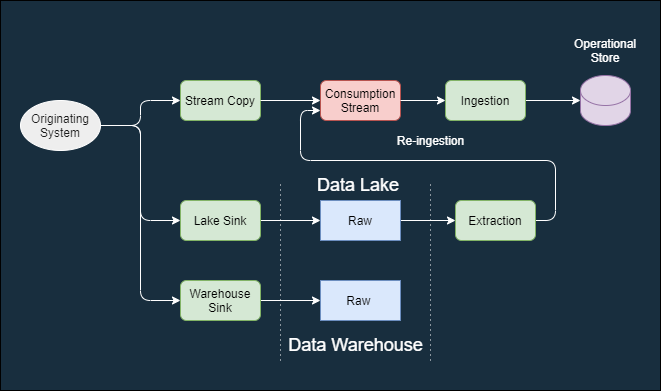
Enterprises move from batch to streaming data ingestion in order to make data available in a more near time  manner. This does not remove the need for extract and load capabilities.  Streaming systems only operate on data that is in the stream  right now .  There is no data available from a time outside of the retention window or from prior to system implementation.  There is a whole other set of lifecycle operations that require some type of bulk operations. Examples include: Initial data loads where data was collected prior or outside of streaming processing. Original event streams may need to be re-ingested because they were mis-processed or because you may wish to extract the data differently. Original event streams fixed/ modified and re-ingested in order to fix errors or add information in the operational store. Privacy and retention rules may require the generation of synthetic ev...

Routing Java Logs and Business Events to Kafka - via logging

Image
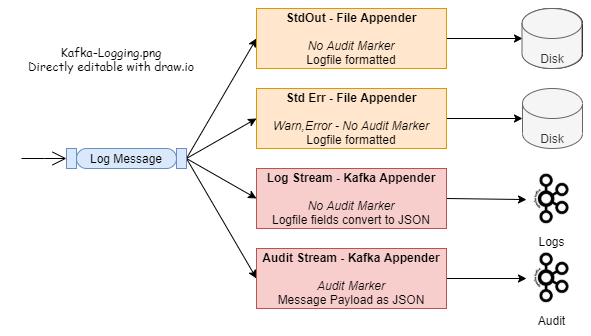
We often want to stream business events or raw logs from our applications to an analytical or operational data stores.  Kafka is currently one of the streaming APIs/platforms of choice for this.   Java applications can use their standard logging APIs and send the logs to Kafka via the Kafka Appender that can be attached to the log4j2 subsystem. We can make just a few tweaks to this and use the same logging mechanisms and Kafka platform to capture custom Business Events. Example code is availabe  https://github.com/freemansoft/spring-boot-log-to-kafka-example , It builds on previous work.   The sample code demonstrates using the logging subsystem to route logs and Audit to different destinations based on their severity or associated tags. The example send logs to the console and to a Kafka logs topics.  It sends tagged log messages to the Kafka Audit . topic.  All of this happens with the application code only ...

Slice Splunk simpler and faster with better metadata

Image
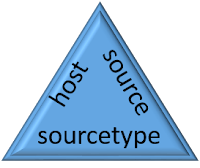
Splunk is a powerful event log indexing and search tool that lets you analyze large amounts of data. Event and log streams can be fed to the Splunk engine where they are scanned and indexed.  Splunk supports full text search plus highly optimized searches against metadata and extracted data fields.  Extracted fields are outside this scope of this missive. Each log/event record consists of the log/event data itself and information about the log/event known as metadata.  For example, Splunk knows the originating host for each log/event.   Queries can efficiently filter by full or partial host names without having to specifically put the host name in every log message. Message counts with metadata wildcards One of the power features of metadata is that Splunk will provide a list of all metadata values and the number of matching messages as part of the result of any query.  A Splunk query returns matching log/event records and the the number of records in e...