Posts

Showing posts with the label OpenCensus

Using OpenTelemetry to send Python metrics and traces to Azure Monitor and App Insights
Image
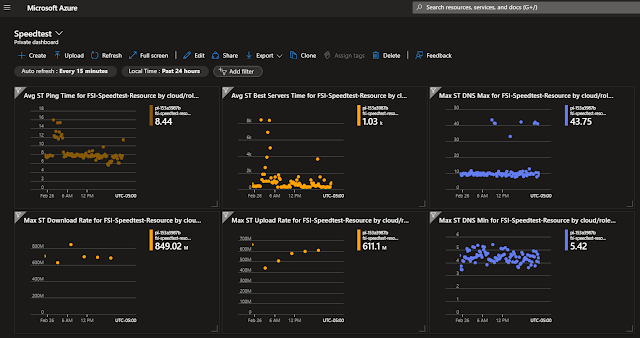
Microsoft has updated its Python libraries that let us send 3rd party library invocation metrics and traces and application-specific custom metrics and traces to Application Insights.  Their OpenTelemetry Exporters make it simple to route the standard Python OpenTelemetry library observations to Application Insights. You bootstrap the Azure config and credentials and then use standard OT calls to capture metrics and trace information. SpeedTest network Metrics in Azure using OpenTelmetry A couple of years ago I wrote a program to record the health of my home internet connection and store that information in Azure Application Insights. I did this with a Python program that leveraged Microsoft's OpenCensus Azure exporter.  That library is becoming obsolete with the move from OpenCensus to OpenTelemetry.   That project has now been ported to Open Telemetry!  It involved 6 hours and 40 lines of code that was preceded by 20 hours of whining and internet surfing. The ...
Querying Python Transactions and Spans as dependencies in Azure Application Insights with OpenCensus

Image
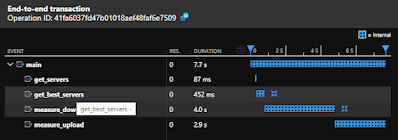
Azure Application Insights is my go-to Observability platform when I want it to "just work". Application Insights can be a collection point for custom and third-party library Python Tracing and Transaction data. You can easily send Python Open Census span data from anywhere in the world into Azure Application Insights. You see your program transaction details from any browser that can reach the Azure console.  OpenCensus  spans are captured in  Application Insights  as  dependencies . The  OpenCensus Azure Exporter  supports nested spans letting you capture and measure nested operations. Every captured span is stored as a row in the Application Insights dependencies table.  The chart to the right was created from this sample code that has one main span and 4 nested sub-spans From FreemanSoft SpeedTest project https://github.com/freemansoft/speedtest-app-insights Executio...

Querying Python logs Azure Application Insight

Image
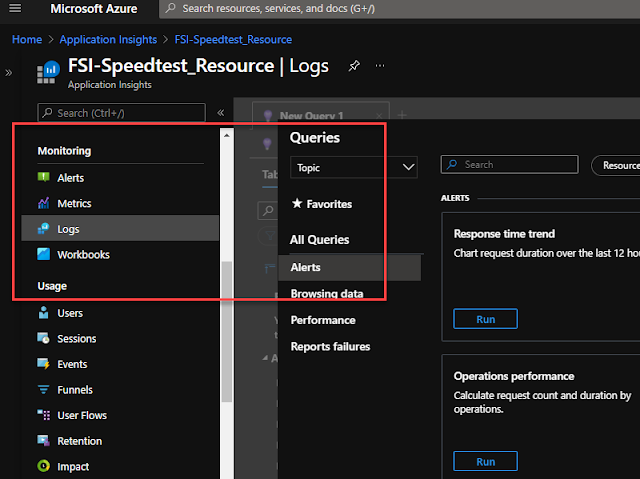
You can send your Python logs to Azure Application Insights from anywhere and then leverage the Application Insights query and dashboard capabilities to do log analysis.  Getting access to the logs is trivial. I wanted to plot basic internet performance information from data generated from two different machines in two different locations.  The source code is on GitHub here  freemansoft/speedtest-app-insights . That project runs speedtest.net measurements and then posts them to Azure Application Insights.  It logs the raw data when the --verbose switch is set.  That verbose output is sent to Azure App Insights. Execution pre-requisites You have an Azure login You have created an Azure Application Insights Application key https://docs.microsoft.com/en-us/azure/azure-monitor/app/create-new-resource You have pushed data to Application Insights.  I used https://github.com/freemansoft/speedtest-app-insights with the _--verbose__ switch Video walkthrou...

Querying Python Metrics as customMetrics and custom attributes as customDimensions in Azure Application Insight

Image
Azure Application Insights can be a collection point for Python Metrics that you can query and filter against.  We can send Open Census metrics from anywhere in the world into Azure Application Insights. This lets us see our program metrics from any browser that can reach the Azure console.  Application Monitor gives us a zero admin performance console. OpenCensus metrics are recorded in Application Insights as customMetrics . Every metric sent is a row in Application Insights. The Azure  OpenCensus Azure Exporter  adds a standard set of attributes that appear in App Insights as CustomDimensions .  We can add additional custom dimensions (attributes) to any metrics record sent Azure Application Insights. All metrics are actually captured in a customMetrics table that we can query against. Execution pre-requisites You have an Azure login You have created an Azure Application Insights Application ...

Displaying Python Metrics in Azure Application Insights

Image
We can capture Python performance metrics in Azure Application Insights. This will let us see our program performance from anywhere that can reach the Azure console.  I've used this to capture a variety of Python data manipulation and process timing without having to stand up any metrics databases or dashboards. I wanted to plot basic internet performance information from data generated from two different machines in two different locations.  The source code is on GitHub here freemansoft/speedtest-app-insights . That project runs speedtest.net measurements and then posts them to Azure Application Insights.  We can create charts for any of the data gathered as part of this process. Target Graphic We want to create a graphical tile that shows our connection ping time broken out per test machine. The program code above posts new ping time data every 5 minutes.  This graphic shows the ping results for the last 4 hours. Execution pre-requisites You have an Azure login You...