Posts

Talking to a Bluetooth Arduino RGB Lamp from C# for Continuous Integration

I previously posted some C# code that I use to gather build status information in a Continuous Integration environment. No CI environment is complete without the Big Red Build  light. In case I'm using a custom dual RGB LED lamp controlled by an Arduino.  This build light communicates through a SparkFun BlueSmirf Bluetooth adapter in it that appears as a COM port on a Windows PC after pairing. The BlueSmirf talks to the Arduino over it's RX/TX pins making it simple to communicate with on the Arduino using it's Serial libraries.  There are newer versions of the BlueSmirf that appear as HID devices for driverless communication but I still like the simplicity of the COM interface and haven't upgraded yet. The ArduinoRGB.cs  C# class accepts a serial port as a constructor and provides a simple API for turning on the various RGB combinations along with programmable blink rates. The API supports multiple RGB lamps in a single device.  TheArduino Uno has 6 PWM ports,...

Gathering TFS Build Information for Continuous Integration

Image
I've moved to a new .Net based project where we use TFS as our build system.  The project is pretty large with 150 developers and over 65 deployable applications, programs and NuGet packages.  The CI, systems integration and stable branch builds results in over 200 different builds on the TFS server.  I'm mostly interested in the Continuous Integration builds, 65 build,s that I'd like to monitor. I really don't want to manage 65 lights, even though that's an excuse for a new hardware project. In this case I'll treat the 65 builds as if they are a single composite build tied to a single status light.  I'll do the same with each of the branch / target types so that I have 3 sets of 65 builds to monitor. The first step is to write some C# code that talks to TFS to get the status of the builds I'm interested in. Microsoft provides a .Net compatible library for communicating with TFS in the Microsoft.TeamFoundation set of libraries. This provides a s...

Creating an Eclipse Dynamic War project from a Maven project is easy

The Maven Eclipse plugin is a great tool that lets you create an Eclipse project from a Maven project with just the mvn eclipse:eclipse command.  It always seems to work great on my big projects,probably  because someone has already done the configuration required to get the right information generated into .project and .classpath.   I've always struggled to make it work in a small demonstration or test project.  The maven constructed Eclipse project is never configured right and I can't run the war on my local Servlet container. Eclipse supports web files through the Eclipse Web Tools Project (WTP) project and through the Dynamic Web Facet when facets are enabled.  The Dynamic Web Facet is either missing or mis-configured after the  mvn eclipse:eclipse command. You must tell the Maven Eclipse Plugin (not to be confused with m2e) to use WTP when building the Eclipse project. The simplest command is:        mvn -Dwtpversion=2.0 ec...

Accessing the RabbitMQ Console in Cloud Foundry

Image
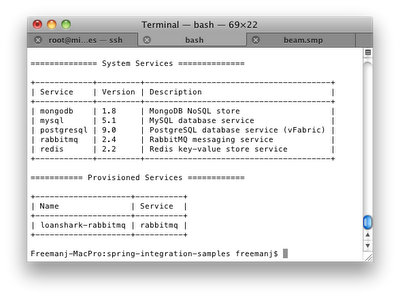
Cloud Foundry - PaaS Each Cloud Foundry instance is a self contained environment (cloud) that is generally intended to be use as a black box application container. It is implemented in a virtualized environment that hides the actual virtual/physical topology from the deployer.  Service configuration, provisioning, log viewing and application deployment are done from outside the cloud through external tools.  Cloud services may use any ports or other resources and use unique usernames and passwords for each instance. Applications rendezvous with services, at run time, via declared service names. Cloud services are not visible outside the container.  All system monitoring must be done through log files, through code deployed in the application or through tooling provided by Cloud Foundry. Service tunneling, where you can bind to the data port of a provisioned service, will be added to Cloud Foundry in a post 1.0 release.  This blog article  describes how it w...

Running RabbitMQ 2.6 and 2.7 on Mac OS/X

AMQP is an open protocol for Asynchronous message queueing.  The number one implementation for AMQP is RabbitMQ.   I normally run RabbitMQ on my Mac in a Linux/Ubuntu VM  but I recently got a new Macbook Air that's limited to 4GB.  I wanted to run RabbitMQ native on the Macbook Air instead of the Linux virtual machine to save space and give me better performance when running tcServer, RabbitMQ and STS on this slightly smaller machine.  Installation RabbitMQ is written in Erlang.  The Mac doesn't come with Erlang so you have to install it. You can use Macports or Homebrew per the Rabbit installation instructions .  I'm lazy so I used Rudix    Erlang-Solutions   which provides Erlang in neat Mac installation packages that put the files in  /usr/local /usr/bin. (The rudix version of Erlang went away over the weekend of 11/12/2011).  Download the img/package mentioned above and install it like any other .img fi...

SeeedStudio 4x4x4 LED cube and Rainboduino

Image
Overview The Seeed Studio Rainbow Cube Kit is a 4x4x4 RGB LED kit with 64 tri-color LEDs for a total 192 connections. The kit comes with professionally designed components. A connector on the bottom of the kit is designed to mate up with the Seeed Studio Rainboduino which contains all of the drivers and connections needed to control an 8x8 tri-color LED array.  The LED cube comes nicely packaged with no installation instructions, schematics or hints.   The LED Cube does have it's own wiki page , which is probably the worst wiki page on the planet with no schematics, theory of operation or description of what kind of line driving is required by controller board. The LED cube wiki does contain a link to a slick Rainbowduino driver program. Assembly instructions are available on the Seeed Studio site. Robotshop has done an instructable and has the assembly instructions on their site. The Rainboduino is an Arduino clone specifically designed for ...