Posts

Showing posts with the label DNS

Azure Hub and Spoke VNets - Private Endpoints and Private DNS Zones
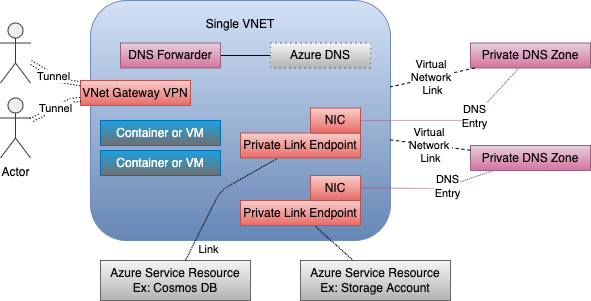
Image
Azure makes it simple to access Azure Cloud Services  from your processes in Azure over the public network.  Things become a little more complicated when you implement the best practice of restricting access to your Azure Services to only your Azure networks (VNets).  This simple action drags in Private Link Endpoints  and Private DNS Zones .  Enterprises typically then layer on multiple Virtual Networks (VNets) for management and control purposes. This VNET Hub and Spoke architecture is pretty common though Microsoft has recently been advising customers to implement HUB and Spoke more through subnets than VNets. This reduces VNet sprawl and the amount of peering and other network magic required   See YouTube video links below Private Endpoints / Private DNS Zones  Azure Standard Sevices can be restricted from the Public Internet to your private Virtual Network (VNet) through the use of Private Link Endpoints (PLE). The PLEs essentially creat...

DNS for Azure Point to Site (P2S) VPN - getting the internal IPs

Image
I wanted to access all my Azure resources without making any of them visible to the Internet.   The easiest give my local machine access to everything on my Azure Virtual Network (VNET) was to connect to it over VPN. It turns out creating Azure VPN gateways and connecting to Azure VPN endpoints is easy.  There are some subtleties in getting DNS name resolution to work that can confuse when first starting out. Setting the Stage There are a few ways to get to Azure endpoints and resources that are blocked from the internet.  We can  Create a Point-to-Site connection from our local machines to Azure Network Gateways Create a Site-to-Site network connection from our local networks to Azure Network Gateways. Use Bastion Hosts Use Cloud Shell Leave everything open to the internet. I chose a Point-to-Site (P2S) VPN connection that connects from my laptop to a VNet Gatewa...

Subdomain DNS for VMWare/Hyper-V Virtual Lab on a MAC

Image
Scenario I have a Windows 7 VM that I do general development on in addition to writing Java or other code on my Mac.  Sometimes I want to push code from my Windows 7 VM to a virtual Windows Server Lab set of VMs.  Other times I want to write a program on the Mac that communicates with servers in my virtual lab.  Direct IP address connection is always possible across these machines butI want name based address resolution so that I can test software the same way it would be in our data center. The virtual lab is powered down most of the time so the DNS solution must work well for general internet traffic when that lab's DNS server is unavailable.   The virtual lab has its own AD server that registers all the Domain members host names and IP addresses. In my case, I have it act as a subdomain of a domain that I have. The subdomain DNS is visible to machines on that private network whether they are in the AD Domain or not. My Windows 7 development VM and my ...