Posts

Showing posts with the label Logging

Python Logging in Color

Image
Every Python programmer still using print statements should up their game and migrate to the Python logging module. That module lets you filter output based on severity settings, lets you send the output to different destinations, and lets you format and structure your output.   This formatting ability lets us create more regular and human-readable output.  A classic developer experience use case for this is to color code the output by severity level.  The following output shows 3 different logging levels in three different colors, INFO, WARNING and CRITICAL. The same output also shows an arrangement that includes: time formatting, module name, level and a logging message. Show me the code! We only need 2 lines of code     root_logger = logging . getLogger ()     CustomFormatter (). replace_formatter (root_logger) when we use this class derived from a thread on stackoverflow  and other places. import logging class CustomFormatter ( logging...

Controlling output using Adafruit Logger in CircuitPython

Image
Print statements are the standard debugging and tracing tool for programs running on microcontrollers in non-real-time sections of code. Print statements are a great tool to generate basic output as long as you always  want the output and always  want the output to go to a serial port.   Use the logger if you want to be able to turn print statements on and off without having to continually re-comment and de-comment them. The Adafruit logging library lets you throttle your log output reducing the amount generated. It lets categorize your logging criticality with levels like DEBUG, INFO, WARN, ERROR, etc.  The logger then lets you set the minimum level of criticality for messages to actually be emitted.  If you set your filter level at WARN then no DEBUG or INFO messages show up in the logs/console. This can speed up an application and reduce resource usage while retaining the ability to enable more information if you need it.  The logging library also l...

Plan ahead for internal correlation and tracing needs

Image
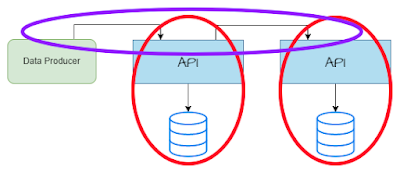
Inter-system and Intra-system tracing capabilities are a must in modern distributed architectures and in systems where dashboards and triage must be done without cracking open the production environment for on-box work. Teams need to understand and verify the lineage of inbound requests that end up in data stores and in outbound calls or notifications to other systems. Lineage and Observability NFRs are the requirement that creates the need for inter and Intra team correlation capabilities.  Everyone should have tracing and monitoring Non-Functional Requirements (NFRs) that describe their observability needs. Those NFRs should describe how a system must support tracking work through a system from the time it enters until the time it transitions to at rest or the time it communicates with other systems.  Teams without these NFRs often end up scrambling to provide production metrics and debugging tools during production events. YouTube Vid...

Log! Don't Print! Use the Python logging library

Image
Python has become one of the most popular application languages in IT, shadow-IT, and data science. Python developers continually improve their systems by iterating from example patterns to best practices.   The Python logging package should be used wherever print() statements were in the past. The logging package makes it possible to classify output at different severities.  logging has the ability to enable and disable the generation of output at those different levels. This means you can create debug-level  statements that are useful to programmers without letting those statements bleed into a production application. The referenced GitHub project shows how to load logging configurations, and how to change where logging goes based on those configurations.  Classify output by severity Filter output generation by severity Send data to different sinks based on the program module and the severity Logging Design Logging is routed through loggers  that are inst...

Routing Java Logs and Business Events to Azure Event Hubs using the Kafka logging appender

Image
Azure Event Hubs implement a Kafka compatible API. This means we can migrate an application from Kafka to Azure EventHubs with minor changes. Retargeting basic Kafka traffic from Kafka to Event Hubs can be just a couple of configuration changes. The sample program sent its logs to Kafka via the Log4J Kafka Appender. It takes just 4 lines of changes in the log4j2.xml configuration file to send the logs to Azure EventHubs instead. You can find the sample program on GitHub in the Event=Hubs-Sink branch https://github.com/freemansoft/spring-boot-log-to-kafka-example/tree/feature/Event-Hubs-Sink Video See the video for a longer explanation. Create Azure Resources We created an Azure Event Hubs Namespace and two individual hubs called logs and audit env.properties We can isolate our endpoint configurations in environment-specific properties files.  The def...

Querying Python logs Azure Application Insight

Image
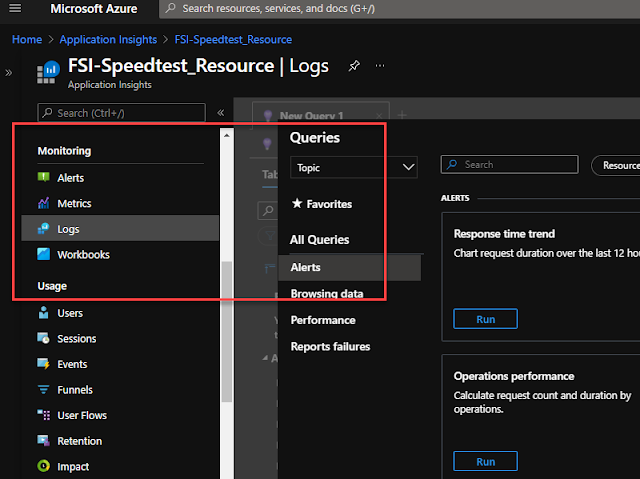
You can send your Python logs to Azure Application Insights from anywhere and then leverage the Application Insights query and dashboard capabilities to do log analysis.  Getting access to the logs is trivial. I wanted to plot basic internet performance information from data generated from two different machines in two different locations.  The source code is on GitHub here  freemansoft/speedtest-app-insights . That project runs speedtest.net measurements and then posts them to Azure Application Insights.  It logs the raw data when the --verbose switch is set.  That verbose output is sent to Azure App Insights. Execution pre-requisites You have an Azure login You have created an Azure Application Insights Application key https://docs.microsoft.com/en-us/azure/azure-monitor/app/create-new-resource You have pushed data to Application Insights.  I used https://github.com/freemansoft/speedtest-app-insights with the _--verbose__ switch Video walkthrou...

Routing Java Logs and Business Events to Kafka - via logging

Image
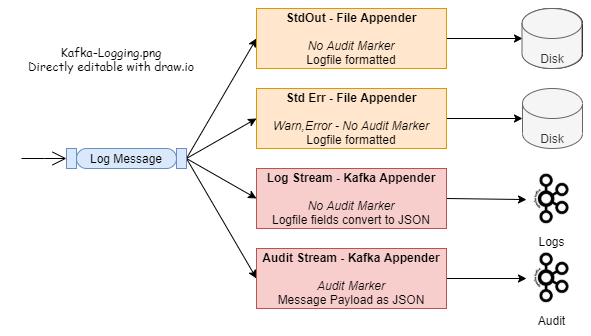
We often want to stream business events or raw logs from our applications to an analytical or operational data stores.  Kafka is currently one of the streaming APIs/platforms of choice for this.   Java applications can use their standard logging APIs and send the logs to Kafka via the Kafka Appender that can be attached to the log4j2 subsystem. We can make just a few tweaks to this and use the same logging mechanisms and Kafka platform to capture custom Business Events. Example code is availabe  https://github.com/freemansoft/spring-boot-log-to-kafka-example , It builds on previous work.   The sample code demonstrates using the logging subsystem to route logs and Audit to different destinations based on their severity or associated tags. The example send logs to the console and to a Kafka logs topics.  It sends tagged log messages to the Kafka Audit . topic.  All of this happens with the application code only ...

Slice Splunk simpler and faster with better metadata

Image
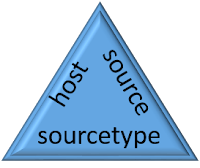
Splunk is a powerful event log indexing and search tool that lets you analyze large amounts of data. Event and log streams can be fed to the Splunk engine where they are scanned and indexed.  Splunk supports full text search plus highly optimized searches against metadata and extracted data fields.  Extracted fields are outside this scope of this missive. Each log/event record consists of the log/event data itself and information about the log/event known as metadata.  For example, Splunk knows the originating host for each log/event.   Queries can efficiently filter by full or partial host names without having to specifically put the host name in every log message. Message counts with metadata wildcards One of the power features of metadata is that Splunk will provide a list of all metadata values and the number of matching messages as part of the result of any query.  A Splunk query returns matching log/event records and the the number of records in e...