Posts

Showing posts with the label ESP8266

Working with state in MicroPython Timer callbacks
Image
MicroPython supports hardware and software timers with callbacks. Timers can be configured as single-shot or periodic events meaning they trigger only once or on a periodic basis. You can bind a Python function to the timer running in either mode.  Your function will receive a  callback  whenever the timer rolls over or expires.  Hardware timers are bound to the actual CPU timers and typically correlate 1:1 to hardware devices.  This means the hardware timer configuration is hardware specific to the size and capabilities of the hardware timers.  In general, you can only tie one callback to each timer because the callback is bound to the hardware timer interrupt handler.   MicroPython also supports software timers. Software timers are the only option on CPUs like the ESP8266 where hardware timers are scarce or are dedicated to other functions. They have the same callback/handler restrictions as hardware timers. Video Content YouTube:  Working ...
Running timed background tasks on IoT devices the easy way with MicroPython

Image
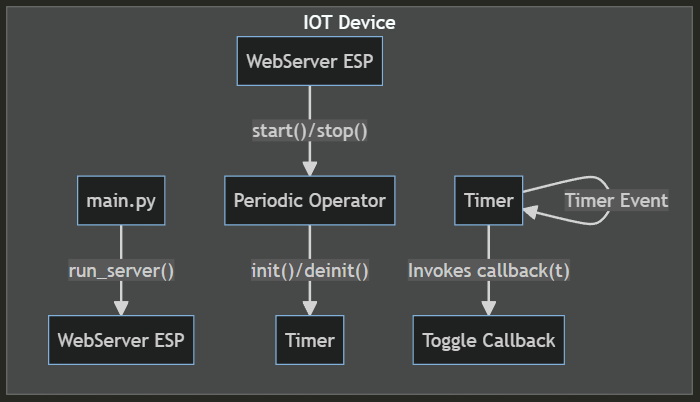
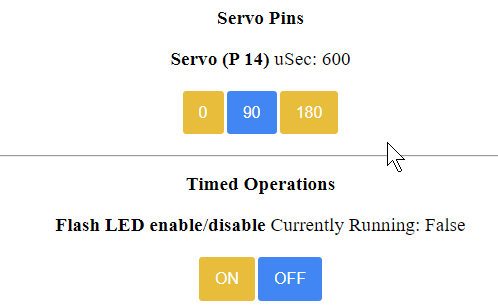
MicroPython is single-threaded but it turns out it is easy to have it do periodic tasks while doing other work like waiting on network requests when running a web server. Here we demonstrate a simple wrapper class that makes it trivial to trigger actions with a timer while at the same time accepting web requests. Everything discussed here runs on a simple ESP8266 IOT board. The code is on Github https://github.com/freemansoft/ESP8266-MicroPython Web Server gives direct control and enables Timed Events The IoT device runs a small web server written in MicroPython.   It coughs up a web page with a series of device controls.  This image contains a direct servo pin control and a timed operations control.  The latter basically causes some action to be taken on a regular basis, in this case flashing an LED.  This happens continually while the system waits for and receives HTTP requests on this UI. We can move the servo around while the light flashes without any com...

HTTP controlled LEDs and Relays with MicroPython and an ESP8266

Image
MicroPython makes it easy to create remote control or remote sensing devices.  We're going to expose two pins to web-based remote control with just a few lines of code. The code here is available on GitHub https://github.com/freemansoft/ESP8266-MicroPython Simple GUI Our GUI is a simple set of on/off buttons that toggle two pins.  The page shows the current state of the pins taking into account any pin inversion.  Click on image to enlarge My ESP8266 board has an LED on Pin 2 and a Relay on Pin 16. API is simple GET calls The device API is exposed as a set of simple GET calls.  You can see these in the URL bar when you click on any of the buttons. http :// 10.0.1.97 / ? dev1=on http :// 10.0.1.97 / ? dev1=off http :// 10.0.1.97 / ? dev2=on http :// 10.0.1.97 / ? dev2=off Yeah, these URLs are kind of funky.  The code is dumb so they need to match exactly.  The server ignores any parameters other than these.  The server may be susceptible to buffer ...

MicroPython - Iterative development process with an ESP8266

Image
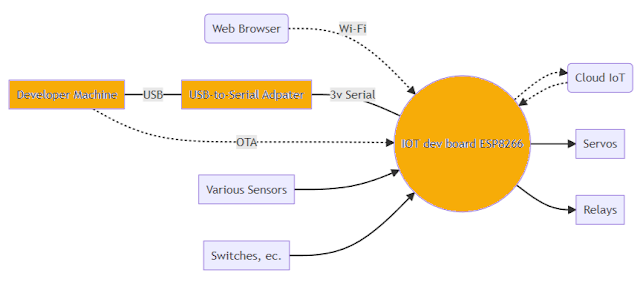
MicroPython lets you create Python-based modules that can be built on top of the frozen base Python image. You can upload python (py) files to the device's file system where they can be run separately and then called as part of the final product. Many teams can just use the existing Python capabilities and the bundled C modules without having to create c code of their own. There is a set of problems that are not real-time constrained and a class of  relatively inexpensive   IoT devices that are just spacious enough to support modular software and incremental updates.   Micropython makes it easy for the average developer to build modular software and incrementally develop and update components.    Developing software for IoT devices can be painful because there is no way to debug, step through or instrument code. The code runs from beginning to end.  It is debugged by looking at external symptoms or serial port output. Software is downloaded to the devi...

Flashing MicroPython onto a generic ESP8266 IoT controller

Image
You can program the ESP8266 and ESP32 with a variety of tools and platforms including raw C, NodeMCU, Arduino IDE, LUA, and MicroPython. If you are here then you want to try MicroPython. Let's get MicroPython on our test board so that we start development. Test mule with an ESP8266EX with a 24Mhz crystal and relay Required Components ESP8266 compatible board or module A USB to 3.3V adapter and cable A PC with a USB port and Internet Access Installation and Verification Steps We're going to erase the program memory and then load MicroPython into the program memory just erased. Finally, we will test with a small bit of Python code. These are the steps I took to flash my ESP8266 board using my Windows 11 PC. Development Machine ESP8266 Target Device Comments Install Python3 Install esptool Python 3 tools are required to flash the ESP8266 over serial. Future updates can be OTA. python3 -m pip install esptool Unplug the board Set the jumper to program GPIO tied to ground...