Posts

Azure Site-to-Site VPN with a Netgear FVS318N

Image
Azure supports two types of VPN connections.  Site-to-site bridges your internal network to an Azure VLAN effectively creating a single large routable network.  Point-to-site joins a single machine to an Azure VLAN effectively putting that machine behind the Azure firewall. You can get a high level overview of this from  previous b log.  I also walked through how to create a point-to-site in a previous blog . I wanted to join my home office network to Azure so that I had  back side  access to all of my IaaS machines.  These machines are all installed on a VLAN (10.0.2.x) with ACLs blocking external port access. My home office runs with a single public IP with a Netgear FVS318N VPN capable firewall behind my cable modem. I do not have a complicated nested network.  The office is a 192.168.1.x network in a NAT configuration behind the Netgear. Some Microsoft documents recommend a Windows RRAS server with multiple LAN cards in it. One LAN ca...

Azure acess models

Image
Azure is primarily aimed at public facing services and web sites. You can see this in the way some Cloud Service features are only available at Azure's public edge.  Azure provides the ability to interact  machines remotely through the public ports and services. Sometimes you don't want everything  exposed to the internet so you can get access to it. A VPN can be used in those cases provide secure no public machine-to-network or network-to-network connectivity Standard Access Applications and services are deployed in the Azure environment as a kind of virtual data center.  Individual machines and programs communicate with each other using the internal Azure network.  Azure virtual machines can also communicate from Azure to other sites on the internet. Machines external to Azure normally communicate with Azure machines through their publicly defined service interface points. Most services run on standard ports for Azure-to-Azure  communications. Th...

Running the Microsoft ALM TFS 2013 (Hyper-V) Virtual Machine in VMWare without Persisting Changes

This blog describes how to run the Microsoft TFS/ALM Hyper-V virtual machine in one of the VMWare hypervisors (Player/Workstation/Fusion). You can use the same concepts for any other virtual machine/appliance. The 2013 RTM  ALM image comes with a set of TFS and Visual studio labs .  The virtual machine and the labs  have a couple expectations: It comes as a a Hyper-V VHD running an evaluation copy of Windows Server 2012. The work items and other information are "point in time" information.  This means sprint, iteration or other information can only be used in the labs if the VMs time is set to a specific date(s).  The machine resets the time to the same specific date and time on every reboot. This lets you re-run the exercises.  Pay attention to the places the way the time is set if you wish to use this process for Virtual Machines anchored at dates and times other than the ones used for the TFS 2013 RTM ALM image used in this post. The labs work bes...

Microsoft Code Analysis results differ based on Configuration

Image
Background Code Analysis (CA) is a very useful Visual Studio feature that applies good practice type static code analysis to your code base.  You can run CA manually at any time or configure it to run automatically on each build. Automatic execution can be configured per configuration per project. This means you can enable automatic CA on Release builds while ignoring it during builds in Debug mode.  Some teams do this to speed up the debug compilation cycle.  I'm not sure what in CA makes it so slow that you can't run it all the time :-( You can view which CA rules apply for any configuration or CPU type via the Solution Properties window: You can set the automatic execution of CA on a per project basis in the Code Analysis pane of the Project Properties: The method of Code Analysis  menu item and the position of the results varies by Visual Studio Version. The menu item that executes CA is located on the Build  menu in VS2013. Unexpected Beh...

Importing a bootcamp partition into VMWare Fusion when it has Hyper-V enabled.

Image
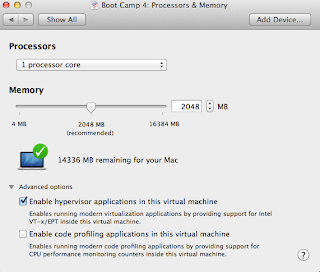
This is quick note on importing a Windows 8 or Server 2012 BootCamp partition that had Hyper-V hypervisor enabled. By default, you cannot have Hyper-V booted inside of Fusion because of hardware vitualization conflicts.  You know you have this problem if you see the following messages in the guest machine's window in VMWare Fusion. Your PC ran into a problem and needs to restart.  We're just collecting some error info, and then you can restart. (100% complete) If you'd like to know more, you can search online later for this error:  SYSTEM_THREAD_EXCEPTION_NOT_HANDLED (winhv.sys) Edit the Fusion VMX configuration file directly. You can fix this by editing the vmx file directly. Shutdown Fusion Find your Virtual Machine definition. Navigate to /users/<username>/Library/Application Support/VMWare Fusion/VirtualMachines/Boot Camp . Right Click on the Boot Camp package and select Show Package Contents Edit the file that ends in .vmx  using TextEdit o...

Micro Clound Foundry V2 - PaaS with Stackato - Languages and Applications

Death Notice  Stackato was sold to HP and rebranded as Helion. The entire Helion product line was killed in 2016 Previous blog article A previous blog article described how to set up a developer micro PaaS using the Cloud Foundry based Stackato from ActiveState.  This article will describe some of the languages available in this environment. Application Languages Cloud Foundry and the Application Stackato clusters support the following languages "out of the box". You can use any of these languages in the Micro CloudFoundry instance we just configured Java, using the Tomcat server Node.js Perl PHP Python Ruby .Net languages are supported through either the Mono runtime or integrated .Net support provided by Iron Foundry. Active State has several  wiki/blog pages  on this. Other languages, including Clojure, can be added by importing  Heroku BuildPacks. Demo Apps Stackato demo programs http://community.activestate.com/stackato/...

Micro Clound Foundry V2 - PaaS on a stick the easy way with Stackato

Image
Death Notice  Stackato was sold to HP and rebranded as Helion. The entire Helion product line was killed in 2016 Previous Blog Text Cloud Foundry  Open Source Platform as a Service (PaaS). It was initially driven by VMWare and later given to Pivotal when it was spun off from VMWare and EMC. The original version of Cloud Foundry was available as a hosted service and in a Micro  developer version that ran on a single VM that could be hosted on a developer workstation.  A community grew around this and there are now multiple versions of Cloud Foundry available. Cloud Foundry supports a Multi-tenant architecture where a cloud can support multiple organizations  each of which can have multiple spaces  to partition their work.  This architecture is available across all CF PaaS installations. Cloud Foundry updated to a new V2 architecture and implementation in June of 2013.  The CF "on a stick" micro version was abandon at that time. The Micro...

Viewing all files in OSX Mavericks

I was having a problem with VMWare after my Windows 8.1 upgrade.  Windows 8.1 had no network connectivity.  I ran into the same problem after upgrading a Windows 8 guest to Windows 8.1 on a Windows host. I wanted to look at my VMWare Fusion configuration for my bootcamp partition.  VMWare stores its information in ~/Library/Application Support/VMware Fusion/Virtual Machines which is normally not visible in the Mac Finder.  There are a bunch of pages on the interweb that describe how to make all directories and files show up in Finder.  Many of them are incorrect for Mavericks which is now case sensitive.   This posting describes how to show all files in Finder. You can show all files by typing the following in a terminal window defaults write com.apple.finder AppleShowAllFiles -boolean true killall Finder You can go back to the default view by typing the following in a terminal window defaults delete com.apple.finder AppleShowAllFiles killall ...

Monitoring Azure from a Raspberry Pi B?

Image
We have an Azure cloud network that we would like to monitor with a standalone status board.  One option is to do the "all Microsoft" Powershell thing with a windows device. Another option is to use the Linux and MAC Azure management tools released in 2012. There is also a Node.js based set of tools . An older MSDN blog entry is also useful for understanding this. Another option is to directly consume the Azure REST services used by the Node.js library.   I decided to try the Node.js tools.   REST service information is available on MSDN. It didn't work out for this generation of Raspberry Pi Hardware Sometimes when you have stuff lying around you just have to come up with some way to use it. Sometimes it works out fine and some times not so much.  I have a 700MHz 512GB  Raspberry Pi B computer sitting on the shelf with nothing to do. It is a nifty Linux ARM based computer: with built in Ethernet, USB, video and an hardware extension bus. This could host o...